 Firefox
About SILVER SCREEN DECO JNL Font
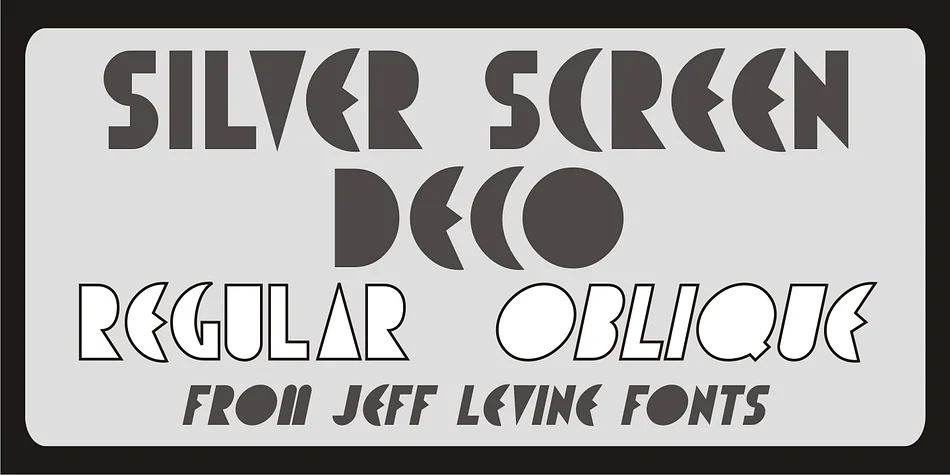
Silver Screen Deco JNL by Jeff Levine Fonts is an Art Deco display typeface drawn from the neon marquee lettering of a 1963 Los Angeles theater. It captures the streamlined geometry and polished elegance that defined the style during Hollywood's golden age, with a distinctly theatrical character that reads as both sophisticated and nostalgic. The font's angular letterforms reflect the geometric precision that made Art Deco such a striking visual language.
When you're working on vintage movie theater posters, 1920s-inspired wedding invitation suites, or art deco book covers, this typeface brings authentic period detail to your projects. Speakeasy event signage, retro diner menus, and vintage cosmetics packaging all benefit from the bold letterforms and visual presence this font delivers. The design has enough personality to command attention without sacrificing legibility, making it useful across print and digital applications where you need that old-school Hollywood feel. Its distinctive character works just as well on a wedding program as it does on a vintage-inspired album cover or boutique storefront sign.
Silver Screen Deco JNL comes in both regular and oblique versions, giving you the flexibility to add emphasis and variation to your layouts as your design demands. Head to Creative Fabrica to get this font and bring some theatrical sophistication to your next project.
Style & Use Cases
- Overall Style
- Bold, Distinctive
- Use Case
- Headlines, Posters
- Ideal For
- logos, packaging, and standout titles
- Pairs With
- a neutral sans-serif
How to Install SILVER SCREEN DECO JNL Font
Step-by-step instructions for every platform
- 1Download the SILVER SCREEN DECO JNL font file (.ttf or .otf).
- 2Locate the downloaded file in your Downloads folder.
- 3Right-click the font file.
- 4Select "Install" to install for the current user, or "Install for all users" to make it available system-wide.
- 5SILVER SCREEN DECO JNL is now available in Word, Photoshop, Illustrator, and all other apps.
More by Jeff Levine Fonts
View all →



Browse fonts by theme
Curated collections →Saw a font in a picture? Identify any font from an image with our free Font Finder.
More Decorative Fonts
Browse all →







What pairs well with SILVER SCREEN DECO JNL Font?
SILVER SCREEN DECO JNL Font is a decorative font that shines as a display or heading face. Pair it with a clean sans-serif or serif font for body text — the contrast creates a clear hierarchy while the two styles stay balanced and easy to read.




SILVER SCREEN DECO JNL Font
Reviewed by the FontBoxDL team · Updated June 2026