 Firefox
 1 / 6
1 / 6About SILENT CINEMA JNL Font
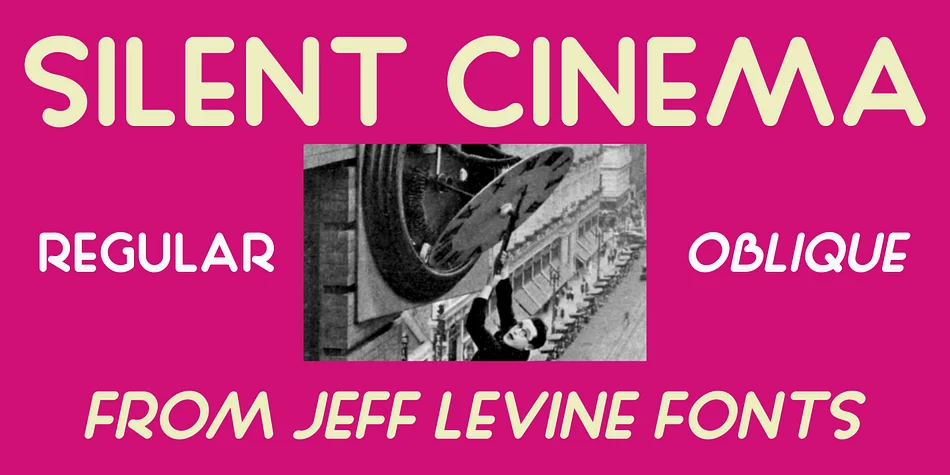
This typeface evokes old Hollywood glamour with understated sophistication. Silent Cinema JNL, designed by Jeff Levine Fonts, descends directly from a 1927 Tiffany Pictures advertisement where hand-lettered sans serif characters began to signal the Art Deco era. The original shapes were created with a round nib pen, which produced those soft, rounded letterforms that define its character.
What makes the design compelling is how it balances geometric structure with genuine warmth. The rounded terminals feel approachable and inviting without any loss of elegance or refinement. You get both regular and oblique weights, giving you real flexibility for creating hierarchy or emphasis without needing to hunt for a companion typeface.
This one excels for vintage theater posters, retro brand identities, speakeasy-style event announcements, and literary cover designs with period flair. It works equally well for boutique cosmetics packaging and luxury product labels where that nostalgic, handcrafted quality matters without veering into amateur territory. Pair it with something clean and straightforward, like Source Sans Pro, for any extended text. The focus stays on what makes the font special while maintaining readability. Head to Creative Fabrica, grab it, and add some 1920s polish to your work.
Style & Use Cases
- Overall Style
- Bold, Distinctive
- Use Case
- Headlines, Posters
- Ideal For
- logos, packaging, and standout titles
- Pairs With
- a neutral sans-serif
How to Install SILENT CINEMA JNL Font
Step-by-step instructions for every platform
- 1Download the SILENT CINEMA JNL font file (.ttf or .otf).
- 2Locate the downloaded file in your Downloads folder.
- 3Right-click the font file.
- 4Select "Install" to install for the current user, or "Install for all users" to make it available system-wide.
- 5SILENT CINEMA JNL is now available in Word, Photoshop, Illustrator, and all other apps.
More by Jeff Levine Fonts
View all →



Browse fonts by theme
Curated collections →Saw a font in a picture? Identify any font from an image with our free Font Finder.
More Decorative Fonts
Browse all →







What pairs well with SILENT CINEMA JNL Font?
SILENT CINEMA JNL Font is a decorative font that shines as a display or heading face. Pair it with a clean sans-serif or serif font for body text — the contrast creates a clear hierarchy while the two styles stay balanced and easy to read.




SILENT CINEMA JNL Font
Reviewed by the FontBoxDL team · Updated June 2026