 Firefox
 1 / 2
1 / 2About SIGN VENDOR JNL Font
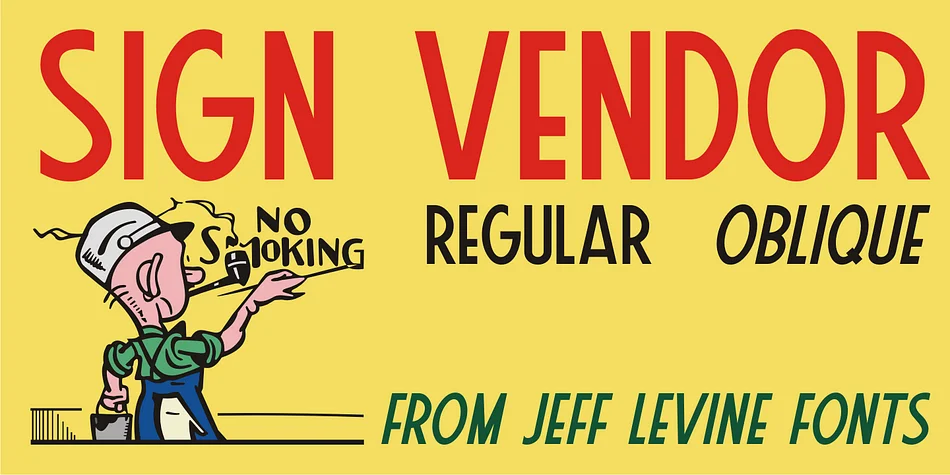
Imagine designing a painted sign for a historic ski lodge or vintage cocktail bar, the kind of hand-drawn lettering you'd find on a 1930s travel poster. SIGN VENDOR JNL, created by Jeff Levine Fonts, captures exactly that spirit. The typeface draws its character from authentic hand-lettering of that era, with subtle Art Deco touches that give it genuine character without feeling overly ornamental or simple.
This font works beautifully for retro diner menus, antique shop window displays, and craft brewery label designs that need instant personality. It's equally at home on vintage ski resort signage, speakeasy-style invitations, or movie theater marquee artwork. The straightforward sans-serif structure keeps it readable even at large sizes, while the handmade quality prevents it from feeling cold or mechanical. Because it stems from actual 1930s source material, it carries authenticity that purely digital recreations often lack.
The design sits at that sweet spot between novelty and usability: distinctive enough to anchor a retro aesthetic, but grounded enough for practical signage work. Craft fair booths, vintage retail displays, and antique market signage all benefit from its confident, nostalgic voice. If you're building anything with vintage appeal, this font belongs in your collection on Creative Fabrica.
Style & Use Cases
- Overall Style
- Bold, Distinctive
- Use Case
- Headlines, Posters
- Ideal For
- logos, packaging, and standout titles
- Pairs With
- a neutral sans-serif
How to Install SIGN VENDOR JNL Font
Step-by-step instructions for every platform
- 1Download the SIGN VENDOR JNL font file (.ttf or .otf).
- 2Locate the downloaded file in your Downloads folder.
- 3Right-click the font file.
- 4Select "Install" to install for the current user, or "Install for all users" to make it available system-wide.
- 5SIGN VENDOR JNL is now available in Word, Photoshop, Illustrator, and all other apps.
More by Jeff Levine Fonts
View all →



Browse fonts by theme
Curated collections →Saw a font in a picture? Identify any font from an image with our free Font Finder.
More Decorative Fonts
Browse all →







What pairs well with SIGN VENDOR JNL Font?
SIGN VENDOR JNL Font is a decorative font that shines as a display or heading face. Pair it with a clean sans-serif or serif font for body text — the contrast creates a clear hierarchy while the two styles stay balanced and easy to read.




SIGN VENDOR JNL Font
Reviewed by the FontBoxDL team · Updated June 2026