 Firefox
About SIGN STUDIO JNL Font
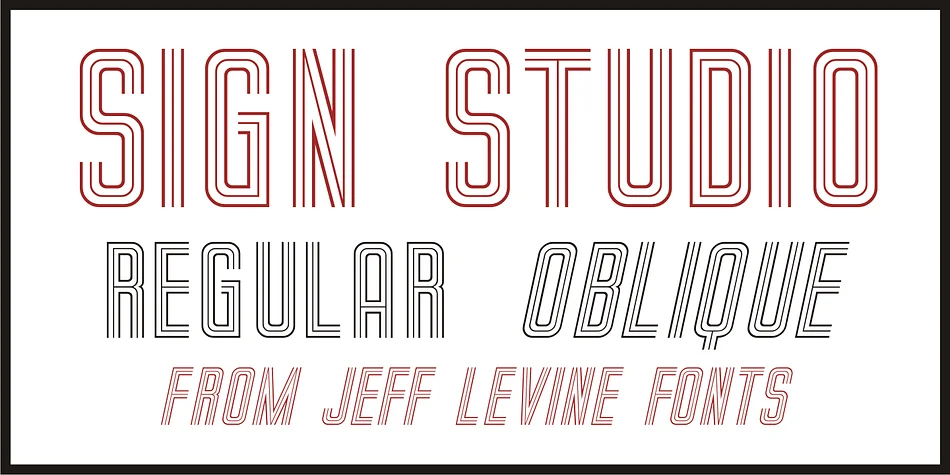
This typeface radiates retro glamour wrapped in geometric precision, evoking the confident elegance of classic luxury design. Sign Studio JNL, designed by Jeff Levine Fonts, draws directly from 1940s French lettering traditions, capturing that unmistakable Art Deco character with open-ended forms that feel striking and beautifully refined in equal measure.
The structure is thoughtfully linear, with a multi-line quality that makes every word command real presence on the page. You'll find it perfectly suited for vintage wedding invitation suites, art deco-themed restaurant menus and branding systems, hand-lettered signage for boutique storefronts, and retro cosmetics or artisan food packaging that needs visual impact. It performs equally well on scrapbooking spreads, DIY craft projects, and special event materials where a dominant display typeface sets the entire visual tone. Both the regular and oblique versions are included, providing you with flexibility to adjust emphasis and flow depending on your specific layout needs and overall design direction.
Pair it with a quiet, minimal sans-serif for body copy or supporting text, letting Sign Studio JNL shine as your primary visual anchor and statement piece on any layout. Head to Creative Fabrica to add this distinctive piece of 1940s letterform design history to your expanding design collection and toolkit.
Style & Use Cases
- Overall Style
- Bold, Distinctive
- Use Case
- Headlines, Posters
- Ideal For
- logos, packaging, and standout titles
- Pairs With
- a neutral sans-serif
How to Install SIGN STUDIO JNL Font
Step-by-step instructions for every platform
- 1Download the SIGN STUDIO JNL font file (.ttf or .otf).
- 2Locate the downloaded file in your Downloads folder.
- 3Right-click the font file.
- 4Select "Install" to install for the current user, or "Install for all users" to make it available system-wide.
- 5SIGN STUDIO JNL is now available in Word, Photoshop, Illustrator, and all other apps.
More by Jeff Levine Fonts
View all →



Browse fonts by theme
Curated collections →Saw a font in a picture? Identify any font from an image with our free Font Finder.
More Decorative Fonts
Browse all →







What pairs well with SIGN STUDIO JNL Font?
SIGN STUDIO JNL Font is a decorative font that shines as a display or heading face. Pair it with a clean sans-serif or serif font for body text — the contrast creates a clear hierarchy while the two styles stay balanced and easy to read.




SIGN STUDIO JNL Font
Reviewed by the FontBoxDL team · Updated June 2026