 Firefox
 1 / 8
1 / 8About Shape Geometry Font
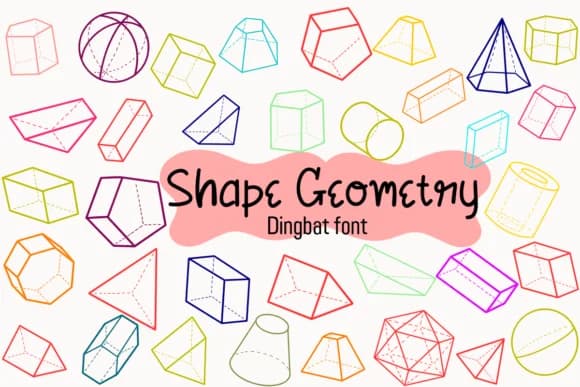
You're setting up your digital planner template in Procreate when you realize you need clean geometric shapes to frame each section, not ornate decorations. Shape Geometry by Petal Pixels is a dingbat font that delivers exactly these kinds of markers: circles, triangles, squares, and more arranged as individual glyphs. Built specifically for study notes, GoodNotes annotations, and digital notebook layouts, it gives you a sharp, mathematical aesthetic that feels intentional rather than randomly decorative.
The shapes work equally well as bullet points in planning templates, section dividers in research documents, and geometric accents on Etsy shop graphics for minimalist stationery bundles. If you're building bullet journal spreads, designing notebook covers, or creating study guide overlays in digital planners, the font's individual characters let you pick and choose exactly which symbols you need. Since each shape stands as a standalone glyph, you can mix them freely without worrying about breaking a pre-made pattern. The versatility comes from having clean geometric forms that don't demand attention, letting your handwritten notes or typed text remain the focus. The clean, precise lines scale smoothly from small notebook markers to large geometric backgrounds, maintaining visual clarity at any size.
Find Shape Geometry on Creative Fabrica and add these practical geometric tools to your design toolkit.
Style & Use Cases
- Overall Style
- Iconographic, Handwriting Font
- Use Case
- Icons, Accents
- Ideal For
- ornaments, bullets, and decorative flourishes
- Pairs With
- any text font
How to Install Shape Geometry Font
Step-by-step instructions for every platform
- 1Download the Shape Geometry font file (.ttf or .otf).
- 2Locate the downloaded file in your Downloads folder.
- 3Right-click the font file.
- 4Select "Install" to install for the current user, or "Install for all users" to make it available system-wide.
- 5Shape Geometry is now available in Word, Photoshop, Illustrator, and all other apps.
More by Petal Pixels
View all →
Browse fonts by theme
Curated collections →Saw a font in a picture? Identify any font from an image with our free Font Finder.
More Dingbats Fonts
Browse all →







What pairs well with Shape Geometry Font?
Shape Geometry Font is a versatile dingbats font that works for both headings and body text. Pair it with a contrasting sans-serif or serif font to add visual interest and a clear distinction between titles and body copy.



Shape Geometry Font
by Petal Pixels
Reviewed by the FontBoxDL team · Updated July 2026