 Firefox
 1 / 8
1 / 8Loading font…
About Flower Font
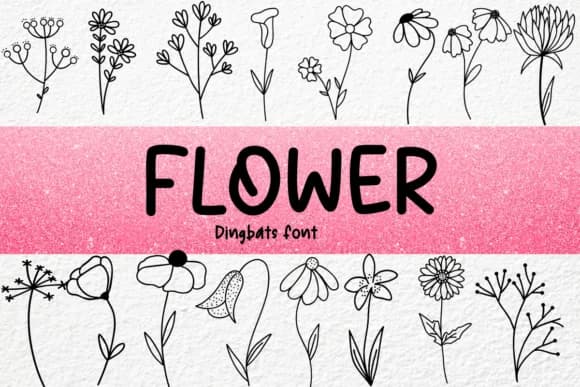
Flower features intricately designed floral motifs rendered as ornamental dingbat characters that function as accents, borders, and decorative flourishes. Created by Petal Pixels, this collection delivers a rich set of botanical symbols and forms that add organic movement and authenticity to layouts without requiring hand-drawn illustration or heavy photographic imagery.
The character set includes diverse flower shapes, leaf arrangements, and stem details that work as both standalone focal points and supporting elements throughout a design. Both OTF and TTF formats come included, ensuring compatibility across design software and operating systems, so you're not limited by platform constraints. Use these characters for wedding invitation suites with coordinated floral accents, artisanal product labels and packaging that convey natural positioning, scrapbooking embellishments for nature-themed layouts, and handmade gift tags that feel crafted rather than commercial.
The dingbat approach offers real flexibility: arrange characters in different orientations and sizes to create borders, scatter accents throughout whitespace, or layer them for depth. With wedding stationery needing delicate corner treatments or packaging for small-batch skincare brands, these floral forms provide dimensional detail that feels hand-crafted. Designers and makers seeking botanical sophistication without commissioning custom illustration will find value here. You'll find Flower on Creative Fabrica.
Style & Use Cases
- Overall Style
- Iconographic, #dingbatsfont
- Use Case
- Icons, Accents
- Ideal For
- ornaments, bullets, and decorative flourishes
- Pairs With
- any text font
How to Install Flower Font
Step-by-step instructions for every platform
- 1Download the Flower font file (.ttf or .otf).
- 2Locate the downloaded file in your Downloads folder.
- 3Right-click the font file.
- 4Select "Install" to install for the current user, or "Install for all users" to make it available system-wide.
- 5Flower is now available in Word, Photoshop, Illustrator, and all other apps.
More by Petal Pixels
View all →

Browse fonts by theme
Curated collections →Saw a font in a picture? Identify any font from an image with our free Font Finder.
More Dingbats Fonts
Browse all →







What pairs well with Flower Font?
Flower Font is a versatile dingbats font that works for both headings and body text. Pair it with a contrasting sans-serif or serif font to add visual interest and a clear distinction between titles and body copy.



Flower Font
by Petal Pixels
Reviewed by the FontBoxDL team · Updated October 2026