 Firefox
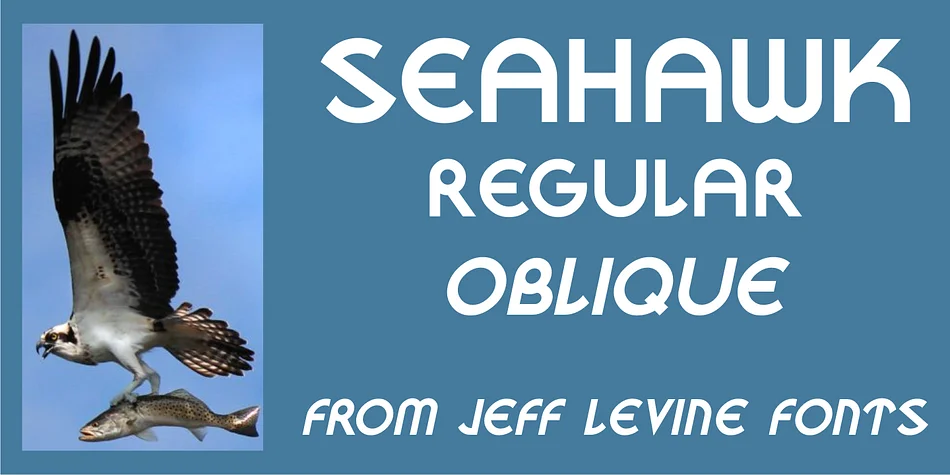
About SEAHAWK JNL Font
There's a playful energy in this font that channels vintage glamour and theatrical flair. Seahawk JNL, designed by Jeff Levine Fonts, draws its character from hand-lettered Art Deco lettering found on a 1939 sheet music cover for "Sea Dreams." The design captures that era's experimental spirit: a teardrop-shaped D curves with unexpected grace, while an S tilts just slightly off-center, alongside other quirky letterforms that feel both intentional and delightfully offbeat. It's the kind of typeface that rewards close inspection; every letter has something distinctive to offer.
This decorative face shines in projects that call for retro charm and distinctive visual personality. Use it for art deco-inspired wine label designs, vintage cosmetics packaging and branding, 1930s-themed theater posters, or speakeasy menu cards. The whimsical character suits niche wedding invitations and event stationery for couples who want something beyond the conventional. The font comes in both regular and oblique versions, giving you flexibility to add extra tilt and movement to your compositions. Pair it with a minimal sans-serif like Montserrat for body copy, which lets the distinctive letterforms take center stage without creating visual tension.
You'll find Seahawk JNL on Creative Fabrica, a decorative typeface with real character and a story woven into every letter.
Style & Use Cases
- Overall Style
- Bold, Distinctive
- Use Case
- Headlines, Posters
- Ideal For
- logos, packaging, and standout titles
- Pairs With
- a neutral sans-serif
How to Install SEAHAWK JNL Font
Step-by-step instructions for every platform
- 1Download the SEAHAWK JNL font file (.ttf or .otf).
- 2Locate the downloaded file in your Downloads folder.
- 3Right-click the font file.
- 4Select "Install" to install for the current user, or "Install for all users" to make it available system-wide.
- 5SEAHAWK JNL is now available in Word, Photoshop, Illustrator, and all other apps.
More by Jeff Levine Fonts
View all →



Browse fonts by theme
Curated collections →Saw a font in a picture? Identify any font from an image with our free Font Finder.
More Decorative Fonts
Browse all →







What pairs well with SEAHAWK JNL Font?
SEAHAWK JNL Font is a decorative font that shines as a display or heading face. Pair it with a clean sans-serif or serif font for body text — the contrast creates a clear hierarchy while the two styles stay balanced and easy to read.




SEAHAWK JNL Font
Reviewed by the FontBoxDL team · Updated June 2026