 Firefox
 1 / 7
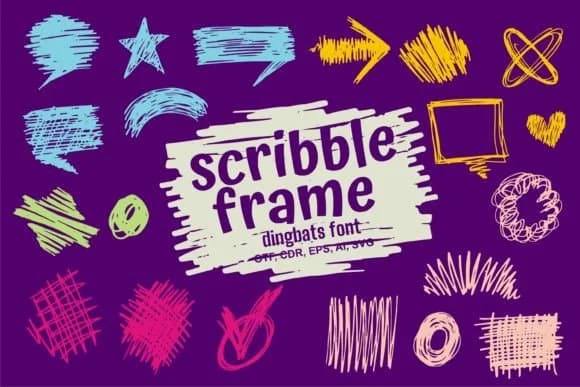
1 / 7About Scribble Frame Font
Scribble Frame by onoborgol is a dingbats collection designed for decorative borders and hand-drawn framing without the work of manual sketching. Each character functions as a standalone frame, corner accent, divider, or ornamental box, bringing that loosely-rendered quality that signals intentional, craft-driven design. The outlined vector construction ensures sharp printing at any scale and works equally well for digital layouts and on-screen applications.
You'll find genuine utility for wedding invitation suites where decorated borders set the tone, DIY gift tags and custom product labels that need visual distinction, scrapbook page layouts with defined framing, and boutique packaging designs where a hand-drawn feel matters. Instead of sketching borders manually, searching through generic design libraries, or layering multiple elements together, you get complete ornaments ready to place in your layouts. Because each character is a ready-to-use frame, there's no assembly required. This collection belongs in your toolkit if you're building hand-drawn aesthetics into your design practice but want to skip the actual drawing process. The variety of characters means you can mix and match different frames depending on your project needs. Check out Scribble Frame on Creative Fabrica and add these efficient dingbats to your working library.
Style & Use Cases
- Overall Style
- Iconographic, Scribble Fonts
- Use Case
- Icons, Accents
- Ideal For
- ornaments, bullets, and decorative flourishes
- Pairs With
- any text font
How to Install Scribble Frame Font
Step-by-step instructions for every platform
- 1Download the Scribble Frame font file (.ttf or .otf).
- 2Locate the downloaded file in your Downloads folder.
- 3Right-click the font file.
- 4Select "Install" to install for the current user, or "Install for all users" to make it available system-wide.
- 5Scribble Frame is now available in Word, Photoshop, Illustrator, and all other apps.
More by onoborgol
View all →
Browse fonts by theme
Curated collections →Saw a font in a picture? Identify any font from an image with our free Font Finder.
More Dingbats Fonts
Browse all →







What pairs well with Scribble Frame Font?
Scribble Frame Font is a versatile dingbats font that works for both headings and body text. Pair it with a contrasting sans-serif or serif font to add visual interest and a clear distinction between titles and body copy.



Scribble Frame Font
by onoborgol
Reviewed by the FontBoxDL team · Updated July 2026