 Firefox
 1 / 8
1 / 8About Scissors Font
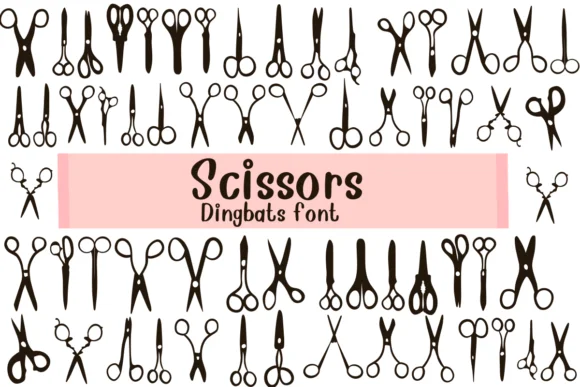
You're designing a salon's appointment cards, building packaging for an indie hair care brand, or creating barber shop signage. Scissors by Nongyao delivers exactly that: a dingbat font where every character is a different scissor icon. Each design offers varied handle styles, blade angles, and levels of detail, giving you multiple options to work with inside a single project without needing to hunt down separate graphics.
This flexibility makes the font useful across beauty, craft, and lifestyle work. Layer different scissors for visual rhythm on hairstyle tutorial graphics, build repeating borders for scrapbooking layouts, or create mixed icon sets for grooming service websites. The outline rendering keeps line weight consistent, whether you're printing a small product label or a large window display. You get both outline and solid weights, so you can adapt to clean, modern branding or playful, illustrated aesthetics depending on your project's personality.
Scale the font anywhere from tiny tags to commanding display sizes without losing character clarity. Its versatility across sizes and print applications makes it reliable for real-world use. Grab Scissors on Creative Fabrica and start building with it.
Style & Use Cases
- Overall Style
- Iconographic, Fonts
- Use Case
- Icons, Accents
- Ideal For
- ornaments, bullets, and decorative flourishes
- Pairs With
- any text font
How to Install Scissors Font
Step-by-step instructions for every platform
- 1Download the Scissors font file (.ttf or .otf).
- 2Locate the downloaded file in your Downloads folder.
- 3Right-click the font file.
- 4Select "Install" to install for the current user, or "Install for all users" to make it available system-wide.
- 5Scissors is now available in Word, Photoshop, Illustrator, and all other apps.




Browse fonts by theme
Curated collections →Saw a font in a picture? Identify any font from an image with our free Font Finder.
More Dingbats Fonts
Browse all →







What pairs well with Scissors Font?
Scissors Font is a versatile dingbats font that works for both headings and body text. Pair it with a contrasting sans-serif or serif font to add visual interest and a clear distinction between titles and body copy.




Scissors Font
by Nongyao
Reviewed by the FontBoxDL team · Updated June 2026