 Firefox
 1 / 8
1 / 8About Scary Pumkin Font
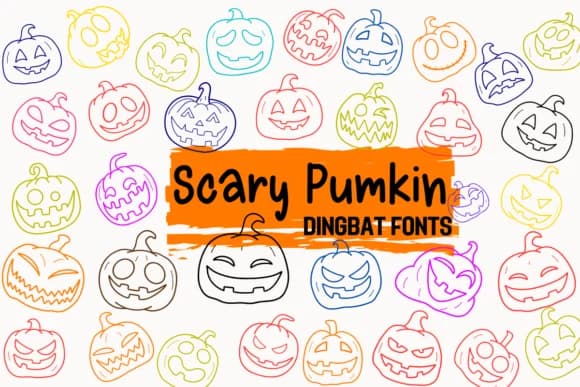
Scary Pumpkin by Petal Pixels is a dingbat font built from jack-o'-lantern characters with distinct expressions. These pumpkin icons serve as building blocks for Halloween party invitations, seasonal greeting cards, and digital planner stickers that need strong visual impact without relying on text. Each character works independently, giving you the flexibility to mix and match expressions or layer them as repeating background patterns. The variety of faces keeps compositions from feeling repetitive, even when working with a single font file across an entire project.
Where this font truly shines is in work that benefits from mood and personality. Fall festival announcements, thumbnail-sized social media graphics, and scrapbooking layouts all benefit from icons that feel hand-drawn rather than corporate. You'll also find these pumpkins useful for Cricut cutting projects or print applications like holiday labels, event posters, and seasonal packaging. The dingbat structure ensures straightforward installation across all major design software, including Procreate, Figma, and desktop publishing applications. Because it's symbol-based rather than traditional glyphs, the characters render consistently regardless of size or software platform, making it a reliable choice for both digital and print workflows.
Creative Fabrica has Scary Pumpkin available now, so you can add these expressive jack-o'-lanterns to your design toolkit immediately.
Style & Use Cases
- Overall Style
- Iconographic, Handwriting Font
- Use Case
- Icons, Accents
- Ideal For
- ornaments, bullets, and decorative flourishes
- Pairs With
- any text font
How to Install Scary Pumkin Font
Step-by-step instructions for every platform
- 1Download the Scary Pumkin font file (.ttf or .otf).
- 2Locate the downloaded file in your Downloads folder.
- 3Right-click the font file.
- 4Select "Install" to install for the current user, or "Install for all users" to make it available system-wide.
- 5Scary Pumkin is now available in Word, Photoshop, Illustrator, and all other apps.
More by Petal Pixels
View all →
Browse fonts by theme
Curated collections →Saw a font in a picture? Identify any font from an image with our free Font Finder.
More Dingbats Fonts
Browse all →







What pairs well with Scary Pumkin Font?
Scary Pumkin Font is a versatile dingbats font that works for both headings and body text. Pair it with a contrasting sans-serif or serif font to add visual interest and a clear distinction between titles and body copy.



Scary Pumkin Font
by Petal Pixels
Reviewed by the FontBoxDL team · Updated July 2026