
 1 / 7
1 / 7About Sanverina Font
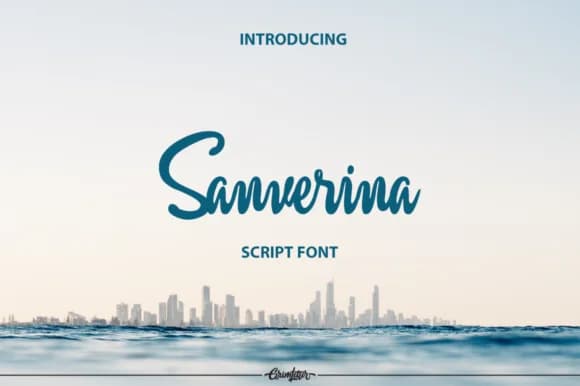
Sanverina by grimletter is a modern script font that merges handwritten character with refined legibility throughout its letterforms. The brush-influenced design captures the authentic appeal of custom lettering while remaining accessible across various applications and different sizes. Its clean construction eliminates unnecessary complexity, making it straightforward to incorporate into design work without steep technical demands or specialized typographic knowledge.
This typeface shines in wedding monogram designs, where flowing strokes enhance formal invitations with genuine personal authenticity and visual warmth. Personalized stationery labels benefit significantly from Sanverina's characteristic charm, bringing real handmade appeal to business correspondence, thank-you notes, and special announcements that stand out. The font also excels in boutique branding materials and signature logo lettering, striking that crucial equilibrium between artistic expression and functional clarity across multiple contexts and applications. Hand-lettered greeting cards, personal blog headers, and social media graphics leveraging the handwritten aesthetic all gain authentic dimension and visual resonance from Sanverina's thoughtfully balanced construction. DIY craft projects, small-batch packaging designs, and artisan product labels represent additional creative spaces where this font's contemporary handwritten style serves both aesthetic and communicative purposes with unmistakable character.
Get Sanverina on Creative Fabrica and bring genuine handwritten warmth to your design projects.
Style & Use Cases
- Overall Style
- Elegant, Flowing, Signature
- Use Case
- Invitations, Branding
- Ideal For
- wedding stationery, greeting cards, and signatures
- Pairs With
- a simple uppercase sans
How to Install Sanverina Font Font
Step-by-step instructions for every platform
- 1Download the Sanverina Font font file (.ttf or .otf).
- 2Locate the downloaded file in your Downloads folder.
- 3Right-click the font file.
- 4Select "Install" to install for the current user, or "Install for all users" to make it available system-wide.
- 5Sanverina Font is now available in Word, Photoshop, Illustrator, and all other apps.
More by grimletter
View all →
More Script Handwritten Fonts
Browse all →







What pairs well with Sanverina Font?
Sanverina Font is a script font that shines as a display or heading face. Pair it with a clean sans-serif or serif font for body text — the contrast creates a clear hierarchy while the two styles stay balanced and easy to read.



Sanverina Font
by grimletter
Reviewed by the FontBoxDL team · Updated May 2026