 Firefox
 1 / 8
1 / 8About Sakura Font
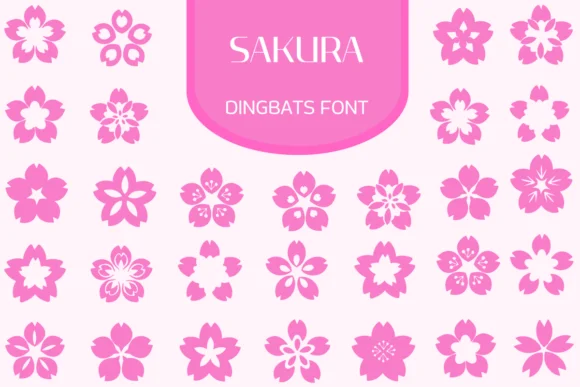
There's something inherently delicate and serene about cherry blossoms. Sakura, by Heartcraft Atelier, is a dingbats collection that brings this springtime elegance into digital design with an extensive library of floral and botanical symbols. The set includes a rich range of stylized sakura blooms and nature-inspired illustrations, each carefully rendered with consistent line weight and organic forms that retain the hand-drawn quality without sacrificing precision or contemporary polish.
This is the kind of font that shines when you're working on wedding invitation suites with botanical themes, creating decorative stickers for Etsy sellers, designing labels for artisan and natural skincare lines, or assembling spring-themed graphic collections for social media campaigns. Available in both OTF and TTF formats, Sakura works across most design software and gives you flexibility in how you layer these floral elements into larger compositions, build decorative frames, or stand them alone as botanical focal points. The consistent visual language makes it easy to mix and match individual blooms to create custom borders and compositions. Pair it with a clean, neutral sans-serif when you need accompanying text, keeping the focus on the dingbats themselves in your visual hierarchy. You'll find Sakura available on Creative Fabrica, ready to bring organic springtime character to your next design project.
Style & Use Cases
- Overall Style
- Iconographic, Fonts
- Use Case
- Icons, Accents
- Ideal For
- ornaments, bullets, and decorative flourishes
- Pairs With
- any text font
How to Install Sakura Font
Step-by-step instructions for every platform
- 1Download the Sakura font file (.ttf or .otf).
- 2Locate the downloaded file in your Downloads folder.
- 3Right-click the font file.
- 4Select "Install" to install for the current user, or "Install for all users" to make it available system-wide.
- 5Sakura is now available in Word, Photoshop, Illustrator, and all other apps.
More by Heartcraft Atelier
View all →



Browse fonts by theme
Curated collections →Saw a font in a picture? Identify any font from an image with our free Font Finder.
More Dingbats Fonts
Browse all →







What pairs well with Sakura Font?
Sakura Font is a versatile dingbats font that works for both headings and body text. Pair it with a contrasting sans-serif or serif font to add visual interest and a clear distinction between titles and body copy.




Sakura Font
Reviewed by the FontBoxDL team · Updated June 2026