
 1 / 2
1 / 2About Rustic Sweetie Pie Font
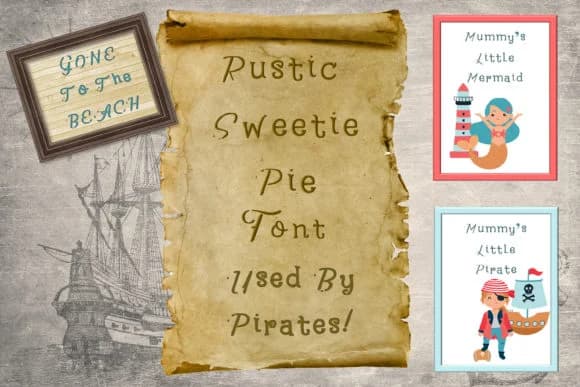
Rustic Sweetie Pie Font by The Paper Princess captures hand-drawn letterforms with genuine warmth and character. The letters move with organic curves and playful quirks that feel homemade rather than polished, making every design feel like it was created by hand.
This script works well for projects built on authenticity and heart. Baby shower invitations benefit from its approachable personality, while rustic wedding place cards and farmhouse kitchen wall art gain depth from the font's warmth. Makers designing homemade bakery labels find it conveys real craftsmanship, and DIY craft signage using this typeface speaks directly to audiences seeking artisanal touches. Etsy sellers frequently choose this font for packaging and product tag design when they want their brand to stand out from generic typefaces and genuinely connect with buyers who value handmade authenticity.
Anyone building a warm, genuine aesthetic into their visual identity should explore this font. Small business owners creating product packaging, DIY crafters making family keepsakes, and anyone designing with handmade integrity will appreciate how this typeface works in their projects. Grab Rustic Sweetie Pie Font on Creative Fabrica and bring that handcrafted warmth into your next design.
Style & Use Cases
- Overall Style
- Elegant, Flowing, Rustic Sweetie Pie
- Use Case
- Invitations, Branding
- Ideal For
- wedding stationery, greeting cards, and signatures
- Pairs With
- a simple uppercase sans
How to Install Rustic Sweetie Pie Font Font
Step-by-step instructions for every platform
- 1Download the Rustic Sweetie Pie Font font file (.ttf or .otf).
- 2Locate the downloaded file in your Downloads folder.
- 3Right-click the font file.
- 4Select "Install" to install for the current user, or "Install for all users" to make it available system-wide.
- 5Rustic Sweetie Pie Font is now available in Word, Photoshop, Illustrator, and all other apps.
More by The Paper Princess
View all →
More Script Handwritten Fonts
Browse all →







What pairs well with Rustic Sweetie Pie Font?
Rustic Sweetie Pie Font is a script font that shines as a display or heading face. Pair it with a clean sans-serif or serif font for body text — the contrast creates a clear hierarchy while the two styles stay balanced and easy to read.



Rustic Sweetie Pie Font
Reviewed by the FontBoxDL team · Updated September 2026