 Firefox
 1 / 8
1 / 8Loading font…
About Rose Border Font
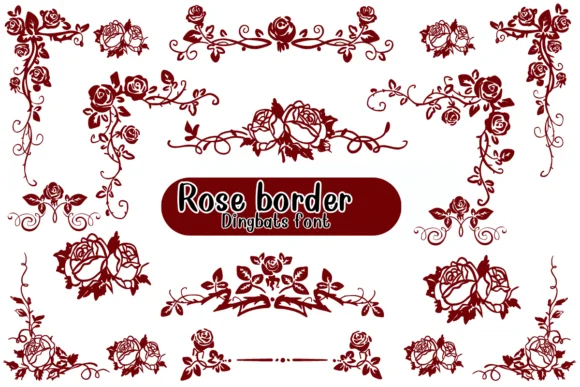
You're building decorative borders for a wedding invitation suite, and you want them to feel hand-drawn. Rose Border by Nongyao delivers exactly this: instead of traditional letters and numbers, each character is an ornamental rose frame or flourish you can layer and arrange to create custom borders. The result is complete creative control, which beats pasting clip art or searching for overlays.
The font shines in botanical product packaging, DIY greeting card designs, and scrapbooking layouts where ornamental detail sets the mood. Coloring projects benefit too, since the outline structure invites watercolor or metallic embellishment. Wedding stationery is the obvious fit, but handmade gift labels, journal covers, and decorative headers all gain character from these floral elements. The retro-botanical aesthetic reads as intentional and handcrafted, whether you're after vintage elegance or contemporary minimalism.
Rose Border works as a collection of glyphs rather than a traditional text typeface, so layering and arranging characters creates the decorative effects you need. Offered in both OTF and TTF formats, it integrates smoothly with Affinity Designer, Procreate, and modern design apps. Find it on Creative Fabrica and build borders that genuinely look handmade.
Style & Use Cases
- Overall Style
- Iconographic, Fonts
- Use Case
- Icons, Accents
- Ideal For
- ornaments, bullets, and decorative flourishes
- Pairs With
- any text font
How to Install Rose Border Font
Step-by-step instructions for every platform
- 1Download the Rose Border font file (.ttf or .otf).
- 2Locate the downloaded file in your Downloads folder.
- 3Right-click the font file.
- 4Select "Install" to install for the current user, or "Install for all users" to make it available system-wide.
- 5Rose Border is now available in Word, Photoshop, Illustrator, and all other apps.




Browse fonts by theme
Curated collections →Saw a font in a picture? Identify any font from an image with our free Font Finder.
More Dingbats Fonts
Browse all →







What pairs well with Rose Border Font?
Rose Border Font is a versatile dingbats font that works for both headings and body text. Pair it with a contrasting sans-serif or serif font to add visual interest and a clear distinction between titles and body copy.




Rose Border Font
by Nongyao
Reviewed by the FontBoxDL team · Updated October 2026