 Firefox
 1 / 8
1 / 8Loading font…
About Rose Font
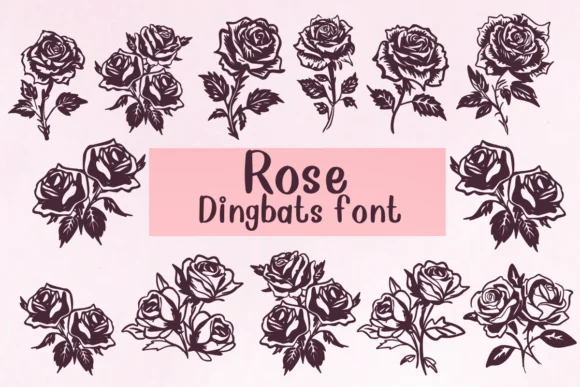
When you're designing wedding stationery, you need decorative floral ornaments that feel hand-illustrated rather than generic stock clip art. Rose, designed by Nongyao, replaces each letter with a detailed botanical rose illustration, giving you a complete alphabet of decorative characters ready to arrange and layer into your layouts.
This outline-format dingbat font treats each character as a distinct rose image you can independently color, resize, or arrange within your design projects. That approach makes it particularly useful for wedding invitation suites requiring matching floral elements across multiple printed pieces, greeting card designs needing consistent hand-drawn illustration, scrapbook layouts centered around botanical themes, and coloring page projects or print-and-fill activities. The outline format shines beautifully in Procreate and Affinity Designer, where you can fill each rose with gradients, textures, or custom colors freely. You get complete typographic flexibility combined with genuine illustration quality without any extra work needed.
Since the roses render crisply at any size and work consistently across different design platforms, Rose lets you build beautiful botanical designs without hunting for individual graphic resources online. Find it on Creative Fabrica and add it to your growing collection today.
Style & Use Cases
- Overall Style
- Iconographic, Fonts
- Use Case
- Icons, Accents
- Ideal For
- ornaments, bullets, and decorative flourishes
- Pairs With
- any text font
How to Install Rose Font
Step-by-step instructions for every platform
- 1Download the Rose font file (.ttf or .otf).
- 2Locate the downloaded file in your Downloads folder.
- 3Right-click the font file.
- 4Select "Install" to install for the current user, or "Install for all users" to make it available system-wide.
- 5Rose is now available in Word, Photoshop, Illustrator, and all other apps.




Browse fonts by theme
Curated collections →Saw a font in a picture? Identify any font from an image with our free Font Finder.
More Dingbats Fonts
Browse all →







What pairs well with Rose Font?
Rose Font is a versatile dingbats font that works for both headings and body text. Pair it with a contrasting sans-serif or serif font to add visual interest and a clear distinction between titles and body copy.




Rose Font
by Nongyao
Reviewed by the FontBoxDL team · Updated October 2026