 Firefox
 1 / 10
About Roberts Script Font
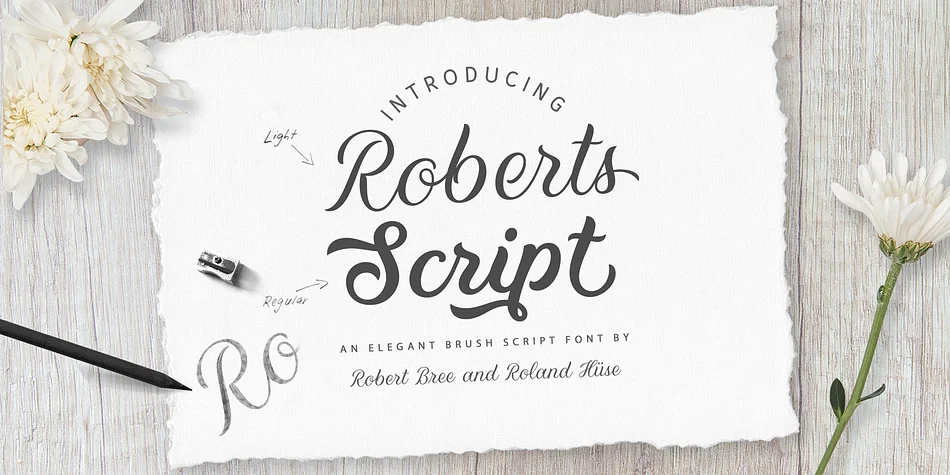
Roberts Script brings the flowing confidence of brush lettering into a typeface designed by Roland Hüse in collaboration with lettering artist Robert Bree. Each character carries a natural, hand-drawn rhythm with smooth curves that feel authentic without looking forced or overly stylized. The design preserves the spontaneous energy of traditional calligraphy while staying modern and versatile enough for both print and digital applications. Two weights, Light and Regular, let you build visual hierarchy or layer text for richer compositions without the hassle of constantly switching fonts.
This is exactly the typeface you reach for when standard sans-serifs feel too corporate or mechanical. Wedding invitation suites, boutique skincare product labels, and hand-lettered event programs all gain presence and warmth when set in Roberts Script. Social media graphics, restaurant menu covers, and custom stationery benefit from its personality and intentional character. Small business branding, specialty bakery packaging, and lifestyle blog headers feel distinctly human and approachable in this script too.
Indie designers, craft businesses, and anyone working on projects that demand personality over pure functionality will find Roberts Script essential. It strikes that balance between refined and relaxed that makes contemporary design feel approachable and genuinely inviting. Get it from Creative Fabrica.
Style & Use Cases
- Overall Style
- Elegant, Flowing
- Use Case
- Invitations, Branding
- Ideal For
- wedding stationery, greeting cards, and signatures
- Pairs With
- a simple uppercase sans
How to Install Roberts Script Font
Step-by-step instructions for every platform
- 1Download the Roberts Script font file (.ttf or .otf).
- 2Locate the downloaded file in your Downloads folder.
- 3Right-click the font file.
- 4Select "Install" to install for the current user, or "Install for all users" to make it available system-wide.
- 5Roberts Script is now available in Word, Photoshop, Illustrator, and all other apps.
More by Fonts by Roland Hüse
View all →


Browse fonts by theme
Curated collections →Saw a font in a picture? Identify any font from an image with our free Font Finder.
More Script Handwritten Fonts
Browse all →







What pairs well with Roberts Script Font?
Roberts Script Font is a script font that shines as a display or heading face. Pair it with a clean sans-serif or serif font for body text — the contrast creates a clear hierarchy while the two styles stay balanced and easy to read.




Roberts Script Font
Reviewed by the FontBoxDL team · Updated July 2026