 Firefox
 1 / 8
1 / 8About Retro Daisy Font
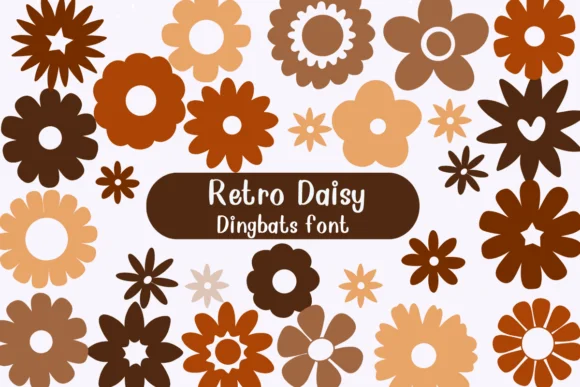
You're creating sticker sheets for a vintage craft brand, and you need pure flowers without filler. Retro Daisy from Nongyao is a dingbat font built entirely from groovy floral shapes that hold up at any size. The character set consists of daisy designs and botanical ornaments rendered in authentic 70s aesthetic, making it ideal for sticker collections, vintage wedding invitations with floral borders, and artisanal product labels where a hand-drawn illustration feel matters more than text.
Each glyph carries genuine retro warmth without the dated or gimmicky feel that plagues so many revival fonts. The font ships in both OTF and TTF formats, so it integrates cleanly into Affinity Designer, Affinity Photo, and Procreate without locking you into one specific workflow. Pair it with cardstock for greeting card suites, use it full-size on DIY transfer sheets for bedroom wall decor, or scale it up for packaging labels on artisanal candles and handmade skincare lines where that flower-child aesthetic actually strengthens the brand story. The outline and fill versions give you room to play with color and layering, turning simple decorative elements into real focal points.
Find Retro Daisy on Creative Fabrica and bring that authentic 70s botanical charm into your designs.
Style & Use Cases
- Overall Style
- Iconographic, Fonts
- Use Case
- Icons, Accents
- Ideal For
- ornaments, bullets, and decorative flourishes
- Pairs With
- any text font
How to Install Retro Daisy Font
Step-by-step instructions for every platform
- 1Download the Retro Daisy font file (.ttf or .otf).
- 2Locate the downloaded file in your Downloads folder.
- 3Right-click the font file.
- 4Select "Install" to install for the current user, or "Install for all users" to make it available system-wide.
- 5Retro Daisy is now available in Word, Photoshop, Illustrator, and all other apps.




Browse fonts by theme
Curated collections →Saw a font in a picture? Identify any font from an image with our free Font Finder.
More Dingbats Fonts
Browse all →







What pairs well with Retro Daisy Font?
Retro Daisy Font is a versatile dingbats font that works for both headings and body text. Pair it with a contrasting sans-serif or serif font to add visual interest and a clear distinction between titles and body copy.




Retro Daisy Font
by Nongyao
Reviewed by the FontBoxDL team · Updated July 2026