 Firefox

 1 / 3
Loading font…
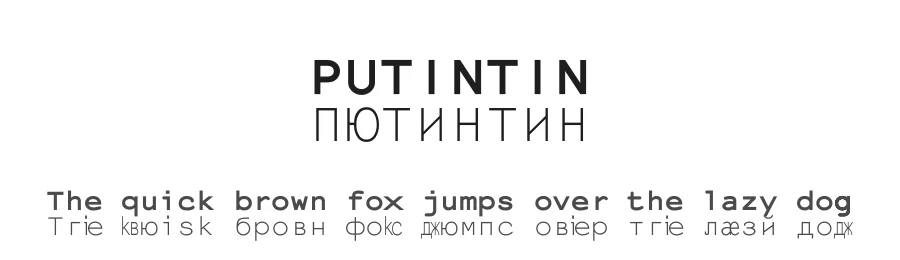
About PUTINTIN Font
PUTINTIN is a bold monospace typeface developed by Walter van Rijn as a collaborative remix, drawing from work by Harrisson, Pierre Huyghebaert, Femke Snelting, Ivan Monroy-Lopez, Yi Jiang, and Nicolas. With 662 glyphs and comprehensive support for 342+ Latin-based languages, this monospace font delivers substantial typographic capability for multilingual projects while maintaining the structured rhythm and precise character alignment that monospace design fundamentally demands.
Where standard monospace fonts lack visual weight, bold variants like PUTINTIN fill a distinct and practical niche in design work. The typeface excels in code-heavy technical documentation where emphasis noticeably improves readability, retro-computing aesthetics in vintage posters and game interface design, terminal-style displays that genuinely benefit from heavier character strokes, and tabular data layouts where bold letterforms create clear visual hierarchy across columns and rows. Its consistent character widths preserve the alignment and spacing precision essential to monospace design, making it a reliable choice for structured content.
Available under the Open Font License (OFL), PUTINTIN is free for both personal and commercial use. Select this font when standard monospace weights feel insufficient for your design needs and you require the structured alignment of a fixed-width typeface without compromising on visual presence or impact.
PUTINTIN Specifications
| Font Family | PUTINTIN |
| Style | Bold |
| Full Name | PUTINTIN |
| Version | 1.1 |
| Weight | 700 (Bold) |
| Glyph Count | 662 glyphs |
| PostScript Name | PUTINTIN |
| Designer | Walter van Rijn, remixing work from: Harrisson, Pierre Huyghebaert, Femke Snelting, Ivan Monroy-Lopez, Yi Jiang, Nicolas Malevé, Ludivine Loiseau |
| Format | TTF (TrueType) |
| File Size | 96.9 KB |
Languages Supported
PUTINTIN supports 342 languages.
How to Install PUTINTIN Font
Step-by-step instructions for every platform
- 1Download the PUTINTIN font file (.ttf or .otf).
- 2Locate the downloaded file in your Downloads folder.
- 3Right-click the font file.
- 4Select "Install" to install for the current user, or "Install for all users" to make it available system-wide.
- 5PUTINTIN is now available in Word, Photoshop, Illustrator, and all other apps.
Browse fonts by theme
Curated collections →Saw a font in a picture? Identify any font from an image with our free Font Finder.
More Monospace Fonts
Browse all →
What pairs well with PUTINTIN Font?
PUTINTIN Font is a versatile monospace font that works for both headings and body text. Pair it with a contrasting sans-serif or serif font to add visual interest and a clear distinction between titles and body copy.




PUTINTIN Font
Reviewed by the FontBoxDL team · Updated October 2026