 Firefox
 1 / 8
1 / 8About Pumpkin Silhouette Font
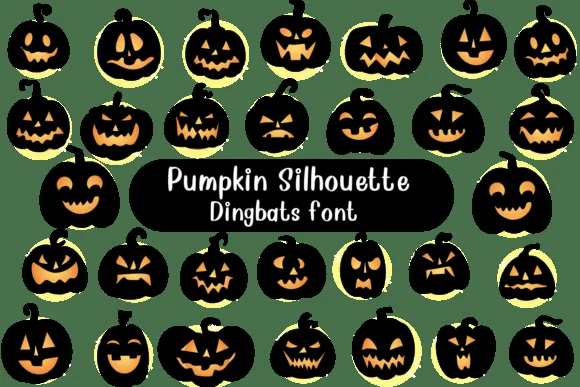
Each letter in Pumpkin Silhouette becomes a different jack-o'-lantern face, designed by Nongyao. The font cycles through a diverse range of pumpkin expressions: some feature menacing triangular eyes paired with jagged, evil grins, while others sport round, cheerful faces or wide toothy smiles that feel less sinister. What distinguishes these glyphs is the bold silhouette treatment combined with carved-out interiors that read as glowing geometric cuts. This foundational design choice gives the whole collection immediate seasonal character, requiring no additional effects or styling to land the Halloween mood.
Built as vector outlines, these pumpkin characters maintain crisp, clean edges at any scale, from small sticker sizes to poster-scale work. You'll find them ideal for decorating Halloween party invitations, designing trick-or-treat themed t-shirt graphics, labeling autumn harvest gift tags, creating DIY porch signs, or building home decor pieces for seasonal displays. Since the font maps each letter A through Z to different pumpkin personalities, every keystroke delivers a fresh variation, giving you built-in design variety without needing to hunt for additional alternates.
This font suits crafters, print designers, and anyone building seasonal campaigns who needs quick, cohesive jack-o'-lantern visuals without investing time in hand-drawn work. Grab it on Creative Fabrica and start using it in your next project.
Style & Use Cases
- Overall Style
- Iconographic, Diy
- Use Case
- Icons, Accents
- Ideal For
- ornaments, bullets, and decorative flourishes
- Pairs With
- any text font
How to Install Pumpkin Silhouette Font
Step-by-step instructions for every platform
- 1Download the Pumpkin Silhouette font file (.ttf or .otf).
- 2Locate the downloaded file in your Downloads folder.
- 3Right-click the font file.
- 4Select "Install" to install for the current user, or "Install for all users" to make it available system-wide.
- 5Pumpkin Silhouette is now available in Word, Photoshop, Illustrator, and all other apps.




Browse fonts by theme
Curated collections →Saw a font in a picture? Identify any font from an image with our free Font Finder.
More Dingbats Fonts
Browse all →







What pairs well with Pumpkin Silhouette Font?
Pumpkin Silhouette Font is a versatile dingbats font that works for both headings and body text. Pair it with a contrasting sans-serif or serif font to add visual interest and a clear distinction between titles and body copy.




Pumpkin Silhouette Font
by Nongyao
Reviewed by the FontBoxDL team · Updated June 2026