 Firefox
 1 / 8
1 / 8Loading font…
About Pumpkin Halloween Font
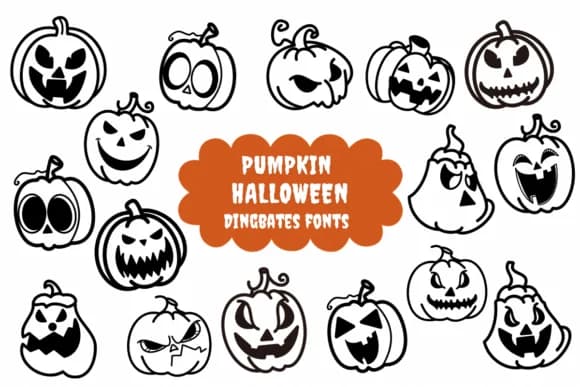
This font radiates mischief and playful spookiness. Pumpkin Halloween, designed by Natchuta, takes the dingbat format and fills each character with a distinct jack-o'-lantern face, complete with different expressions that range from wide grins to subtly sinister stares. Rather than spending time hunting for custom Halloween artwork or complex illustrations, you get instant personality and visual interest baked directly into every keystroke.
The pumpkin faces arrive in bold, high-contrast black silhouettes with crisp edges that hold their definition when printing directly or cutting with a cutting machine. Each character carries that hand-drawn, nostalgic quality you'd recognize from vintage carnival attractions or children's Halloween storybooks, yet the execution remains clean and polished throughout. You'll find it perfect for Halloween party invitations, trick-or-treat bag stickers, seasonal classroom bulletin board displays, vinyl decal designs for storefronts, and merchandise packaging for small retail businesses. The silhouette style reads instantly even when scaled small, making it flexible enough to work in projects of all different sizes.
Pair it with a simple sans-serif like Montserrat or Poppins for any body text, letting the pumpkins carry the visual storytelling weight. Grab it from Creative Fabrica today and bring that nostalgic, handcrafted Halloween feeling into your seasonal design work.
Style & Use Cases
- Overall Style
- Iconographic, Fonts
- Use Case
- Icons, Accents
- Ideal For
- ornaments, bullets, and decorative flourishes
- Pairs With
- any text font
How to Install Pumpkin Halloween Font
Step-by-step instructions for every platform
- 1Download the Pumpkin Halloween font file (.ttf or .otf).
- 2Locate the downloaded file in your Downloads folder.
- 3Right-click the font file.
- 4Select "Install" to install for the current user, or "Install for all users" to make it available system-wide.
- 5Pumpkin Halloween is now available in Word, Photoshop, Illustrator, and all other apps.

Browse fonts by theme
Curated collections →Saw a font in a picture? Identify any font from an image with our free Font Finder.
More Dingbats Fonts
Browse all →







What pairs well with Pumpkin Halloween Font?
Pumpkin Halloween Font is a versatile dingbats font that works for both headings and body text. Pair it with a contrasting sans-serif or serif font to add visual interest and a clear distinction between titles and body copy.



Pumpkin Halloween Font
by Natchuta
Reviewed by the FontBoxDL team · Updated October 2026