 Firefox
 1 / 8
1 / 8About Pumpkin Font
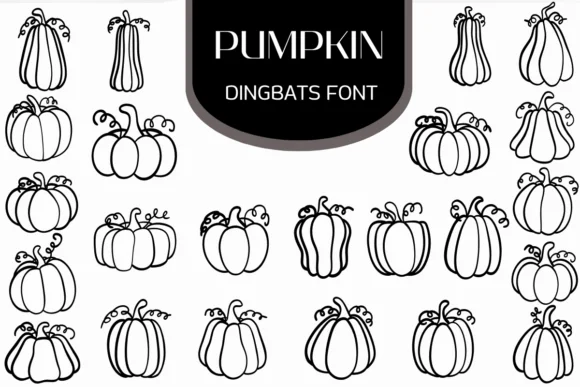
Pumpkin by Heartcraft Atelier is a playful dingbat collection built around hand-drawn pumpkin silhouettes that span the full range of autumn visual traditions. The glyph set moves from stripped-down linear shapes to more elaborate, character-filled designs, so you get genuine visual range without opening multiple font files. Every pumpkin brings its own personality and proportion, making it straightforward to layer different styles within a single layout for visual depth and complexity.
This collection hits its stride with Halloween invitation suites, Thanksgiving greeting card sets, autumn planner stickers, and fall product packaging labels. You'll also find it works beautifully in scrapbooking spreads, DIY harvest-themed signage, and seasonal email graphics. The hand-drawn quality gives finished work a crafted, intentional feel that mass-produced clip art or sterile vector graphics simply can't achieve. There's a warmth to each glyph that reads as thoughtful rather than generic or overly themed.
The diversity built into each character means you can shift tone across a project, working loose and expressive for one piece and structured and minimal for another. If you're looking to add seasonal personality to your work without veering into saccharine territory, this collection gets the balance right. Grab Pumpkin from Creative Fabrica to start bringing autumn projects to life.
Style & Use Cases
- Overall Style
- Iconographic, Fonts
- Use Case
- Icons, Accents
- Ideal For
- ornaments, bullets, and decorative flourishes
- Pairs With
- any text font
How to Install Pumpkin Font
Step-by-step instructions for every platform
- 1Download the Pumpkin font file (.ttf or .otf).
- 2Locate the downloaded file in your Downloads folder.
- 3Right-click the font file.
- 4Select "Install" to install for the current user, or "Install for all users" to make it available system-wide.
- 5Pumpkin is now available in Word, Photoshop, Illustrator, and all other apps.
More by Heartcraft Atelier
View all →



Browse fonts by theme
Curated collections →Saw a font in a picture? Identify any font from an image with our free Font Finder.
More Dingbats Fonts
Browse all →







What pairs well with Pumpkin Font?
Pumpkin Font is a versatile dingbats font that works for both headings and body text. Pair it with a contrasting sans-serif or serif font to add visual interest and a clear distinction between titles and body copy.




Pumpkin Font
Reviewed by the FontBoxDL team · Updated June 2026