 Firefox
 1 / 5
1 / 5About PULP MAGAZINE JNL Font
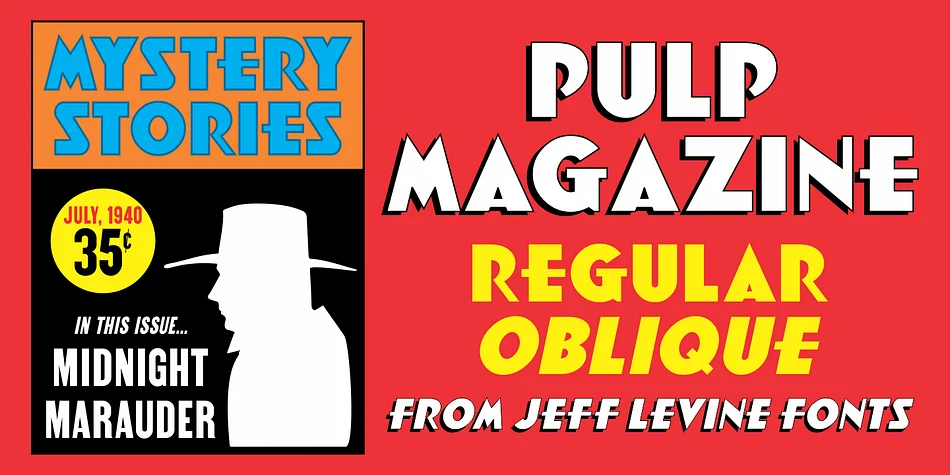
You're designing a poster for a 1940s-themed cocktail bar, and you need type that screams old-school glamour without feeling too delicate. Enter Pulp Magazine JNL, created by Jeff Levine Fonts as a faithful revival of an Art Deco masterpiece from 1939. The original lettering came from an unexpected place: the cover of Spicy Western Stories, a pulp magazine that chose bold, geometric elegance over the Western frontier aesthetic you'd normally expect.
That bold choice proved timeless and surprisingly versatile. The font works beautifully for vintage-inspired product labels, retro nightclub and lounge signage, indie bookstore posters, and craft cocktail menu designs. Its geometric weight and confident letterforms feel at home in any project that calls for authentic period character without slipping into costume territory. The sturdy weight combined with smooth, flowing curves gives every headline presence without pretension.
This typeface comes in both regular and oblique versions, letting you add visual movement and emphasis wherever needed. For large display work especially, the font's solid architecture keeps every letter sharp and readable while preserving that signature Art Deco punch. It's a reliable choice for anyone designing packaging, headlines, or entire brand systems that need authentic retro appeal. Grab it on Creative Fabrica.
Style & Use Cases
- Overall Style
- Bold, Distinctive
- Use Case
- Headlines, Posters
- Ideal For
- logos, packaging, and standout titles
- Pairs With
- a neutral sans-serif
How to Install PULP MAGAZINE JNL Font
Step-by-step instructions for every platform
- 1Download the PULP MAGAZINE JNL font file (.ttf or .otf).
- 2Locate the downloaded file in your Downloads folder.
- 3Right-click the font file.
- 4Select "Install" to install for the current user, or "Install for all users" to make it available system-wide.
- 5PULP MAGAZINE JNL is now available in Word, Photoshop, Illustrator, and all other apps.
More by Jeff Levine Fonts
View all →



Browse fonts by theme
Curated collections →Saw a font in a picture? Identify any font from an image with our free Font Finder.
More Decorative Fonts
Browse all →







What pairs well with PULP MAGAZINE JNL Font?
PULP MAGAZINE JNL Font is a decorative font that shines as a display or heading face. Pair it with a clean sans-serif or serif font for body text — the contrast creates a clear hierarchy while the two styles stay balanced and easy to read.




PULP MAGAZINE JNL Font
Reviewed by the FontBoxDL team · Updated June 2026