 Firefox
 1 / 10
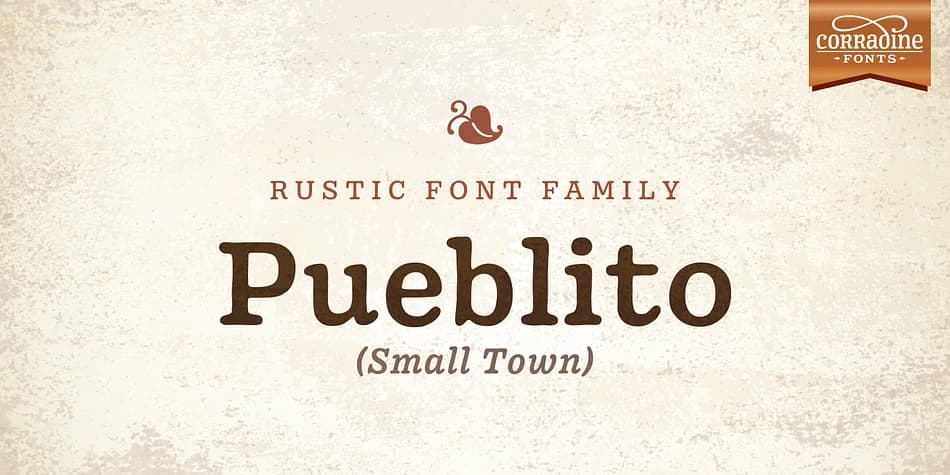
About Pueblito Font
Pueblito's hand-drawn letterforms carry the imperfect charm of aged printing, with each character showing the subtle irregularities that distinguish genuinely weathered type from sterile revival copies. Created by Corradine Fonts, this typeface draws from the visual language of mid-century newspapers and bound volumes, yet resists simply copying those sources. Instead, it captures an aesthetic philosophy: what happens when vintage printing meets contemporary design sensibility. The collection spans twelve fonts across six weights, plus a complementary set of ornamental marks perfect for layering decorative flourishes into any vintage-styled layout.
The real strength of Pueblito surfaces when you're working on projects that actually need to look aged rather than artificially distressed. Antique product labels, heritage packaging, rustic wedding stationery, and nostalgic book jacket designs all benefit from this typeface's inherent patina. Designers reach for it when creating boutique coffee packaging or artisanal ceramics branding, where the worn character of the letters does the heavy lifting. Just add a subtle texture overlay to any piece, and the vintage flavor emerges immediately without requiring heavy post-processing or layering.
Pueblito works best for designers and small brands building cohesive visual systems around historical or artisanal aesthetics. The full range of weights gives you flexibility across display and text applications, supporting everything a vintage-focused project might need. Grab it on Creative Fabrica and start building your next vintage-inspired piece.
Style & Use Cases
- Overall Style
- Iconographic
- Use Case
- Icons, Accents
- Ideal For
- ornaments, bullets, and decorative flourishes
- Pairs With
- any text font
How to Install Pueblito Font
Step-by-step instructions for every platform
- 1Download the Pueblito font file (.ttf or .otf).
- 2Locate the downloaded file in your Downloads folder.
- 3Right-click the font file.
- 4Select "Install" to install for the current user, or "Install for all users" to make it available system-wide.
- 5Pueblito is now available in Word, Photoshop, Illustrator, and all other apps.
More by Corradine Fonts
View all →
Browse fonts by theme
Curated collections →Saw a font in a picture? Identify any font from an image with our free Font Finder.
More Dingbats Fonts
Browse all →







What pairs well with Pueblito Font?
Pueblito Font is a versatile dingbats font that works for both headings and body text. Pair it with a contrasting sans-serif or serif font to add visual interest and a clear distinction between titles and body copy.



Pueblito Font
Reviewed by the FontBoxDL team · Updated August 2026