 Firefox
 1 / 10
About Emblema Font
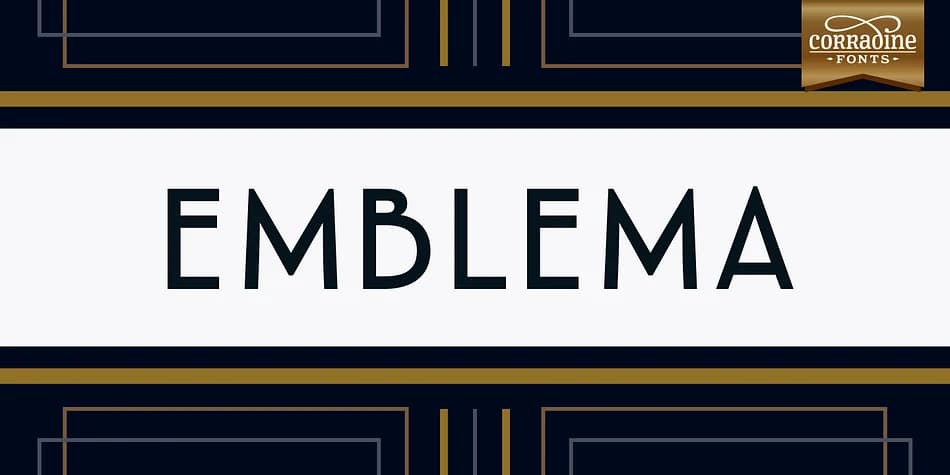
Emblema by Corradine Fonts is a geometric Art Deco typeface that brings 1920s elegance into contemporary design work. The clean lines and structured shapes give it a distinctly modern feel, even while channeling that classic early-century aesthetic. What makes it work for current design is how it balances nostalgia with legibility.
The real power lies in its versatility. Twelve carefully crafted weights let you stack different sizes within a single design while maintaining visual harmony across the whole piece. That's especially useful when you want weight variation without switching fonts entirely. OpenType support gives you access to extensive alternates and ornamental characters, plus three different cap sets (including small caps), so you can dial in exactly the look you need for the specific mood of each project. This family shines for luxury cosmetics packaging, vintage wine label design, high-end wedding invitations, and Art Deco event posters.
The geometric structure keeps it readable even at ornamental sizes, while the decorative alternates and caps add personality that separates serious design from generic templates. Emblema works equally well as a primary headline font or as a layered decorative element. Find it on Creative Fabrica and add this polished Art Deco typeface to your toolkit.
Style & Use Cases
- Overall Style
- Bold, Distinctive
- Use Case
- Headlines, Posters
- Ideal For
- logos, packaging, and standout titles
- Pairs With
- a neutral sans-serif
How to Install Emblema Font
Step-by-step instructions for every platform
- 1Download the Emblema font file (.ttf or .otf).
- 2Locate the downloaded file in your Downloads folder.
- 3Right-click the font file.
- 4Select "Install" to install for the current user, or "Install for all users" to make it available system-wide.
- 5Emblema is now available in Word, Photoshop, Illustrator, and all other apps.
More by Corradine Fonts
View all →

Browse fonts by theme
Curated collections →Saw a font in a picture? Identify any font from an image with our free Font Finder.
More Decorative Fonts
Browse all →







What pairs well with Emblema Font?
Emblema Font is a decorative font that shines as a display or heading face. Pair it with a clean sans-serif or serif font for body text — the contrast creates a clear hierarchy while the two styles stay balanced and easy to read.



Emblema Font
Reviewed by the FontBoxDL team · Updated June 2026