 Firefox
About PUBLIC SAFETY JNL Font
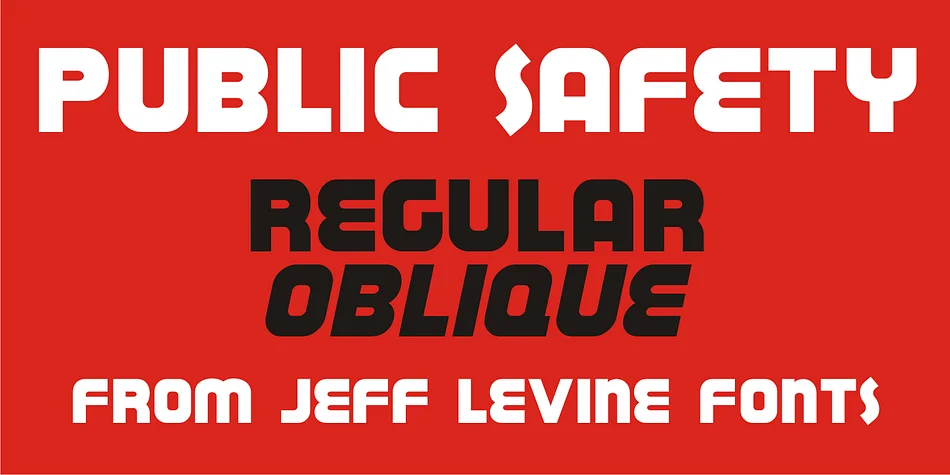
This font punches with the no-nonsense visual authority of a 1940s public safety campaign. PUBLIC SAFETY JNL by Jeff Levine Fonts brings that WPA-era directness into any project where boldness really counts.
The letterforms are chunky and assertive, built on a sturdy sans-serif structure that feels both urgent and grounded at the same time. The font comes in regular and oblique versions, so you can keep the forms upright or angle them to suit your layout's flow and visual rhythm. The weight is substantial enough that it works best when leading with impact rather than filling secondary text or body copy.
This typeface finds a natural home in retro diner menus, vintage concert posters, retro brewery or distillery labels, and historical signage recreations, where that raw 1940s visual punch matters most. It's equally strong for vintage-inspired brand systems or any project needing that direct, no-frills mid-century confidence. The heavy blockish forms need prominence, not buried in smaller sizes or supporting roles. Pair it with a clean, straightforward sans like Helvetica to ground the boldness and let both typefaces work together. Find PUBLIC SAFETY JNL on Creative Fabrica.
Style & Use Cases
- Overall Style
- Bold, Distinctive
- Use Case
- Headlines, Posters
- Ideal For
- logos, packaging, and standout titles
- Pairs With
- a neutral sans-serif
How to Install PUBLIC SAFETY JNL Font
Step-by-step instructions for every platform
- 1Download the PUBLIC SAFETY JNL font file (.ttf or .otf).
- 2Locate the downloaded file in your Downloads folder.
- 3Right-click the font file.
- 4Select "Install" to install for the current user, or "Install for all users" to make it available system-wide.
- 5PUBLIC SAFETY JNL is now available in Word, Photoshop, Illustrator, and all other apps.
More by Jeff Levine Fonts
View all →



Browse fonts by theme
Curated collections →Saw a font in a picture? Identify any font from an image with our free Font Finder.
More Decorative Fonts
Browse all →







What pairs well with PUBLIC SAFETY JNL Font?
PUBLIC SAFETY JNL Font is a decorative font that shines as a display or heading face. Pair it with a clean sans-serif or serif font for body text — the contrast creates a clear hierarchy while the two styles stay balanced and easy to read.




PUBLIC SAFETY JNL Font
Reviewed by the FontBoxDL team · Updated June 2026