 Firefox
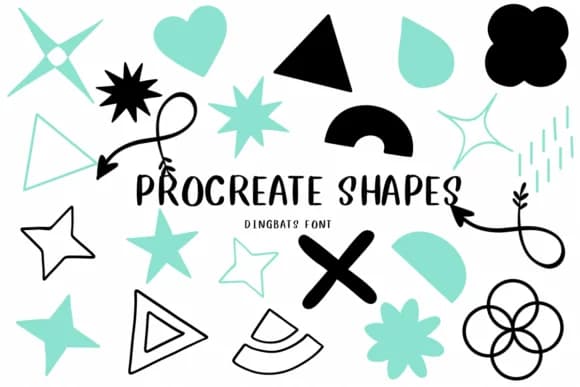 1 / 8
1 / 8About Procreate Shapes Font
This typeface brings playfulness straight to your digital canvas. Procreate Shapes from CHANOK replaces traditional characters with a library of geometric and organic symbols that feel equally at home in retro and contemporary work.
Every keystroke pulls up an icon, blob, star, or abstract form. That means you can quickly assemble custom badge designs, sticker packs, and icon sets right inside Procreate or any digital illustration platform. The font comes with both solid and outlined weight variants, giving you the flexibility to layer shapes for depth, stack them for emphasis, or combine them in ways that wouldn't be possible with static graphics. Its visual language draws equally from retro geometry and hand-drawn sensibility, creating that familiar-yet-modern aesthetic designers keep reaching for when a project needs character without overdoing it.
Consider it for greeting card graphics, decorative packaging mockups, and eye-catching social media templates where shapes carry more weight than type. Pair it with a clean sans-serif like Inter or Roboto for any text sharing the layout, then let the shapes command the visual attention. You'll find Procreate Shapes on Creative Fabrica, ready to expand what your toolkit can deliver.
Style & Use Cases
- Overall Style
- Iconographic, Shape
- Use Case
- Icons, Accents
- Ideal For
- ornaments, bullets, and decorative flourishes
- Pairs With
- any text font
How to Install Procreate Shapes Font
Step-by-step instructions for every platform
- 1Download the Procreate Shapes font file (.ttf or .otf).
- 2Locate the downloaded file in your Downloads folder.
- 3Right-click the font file.
- 4Select "Install" to install for the current user, or "Install for all users" to make it available system-wide.
- 5Procreate Shapes is now available in Word, Photoshop, Illustrator, and all other apps.
More by CHANOK
View all →
Browse fonts by theme
Curated collections →Saw a font in a picture? Identify any font from an image with our free Font Finder.
More Dingbats Fonts
Browse all →







What pairs well with Procreate Shapes Font?
Procreate Shapes Font is a versatile dingbats font that works for both headings and body text. Pair it with a contrasting sans-serif or serif font to add visual interest and a clear distinction between titles and body copy.



Procreate Shapes Font
by CHANOK
Reviewed by the FontBoxDL team · Updated June 2026