 Firefox
 1 / 6
1 / 6About Prego Font
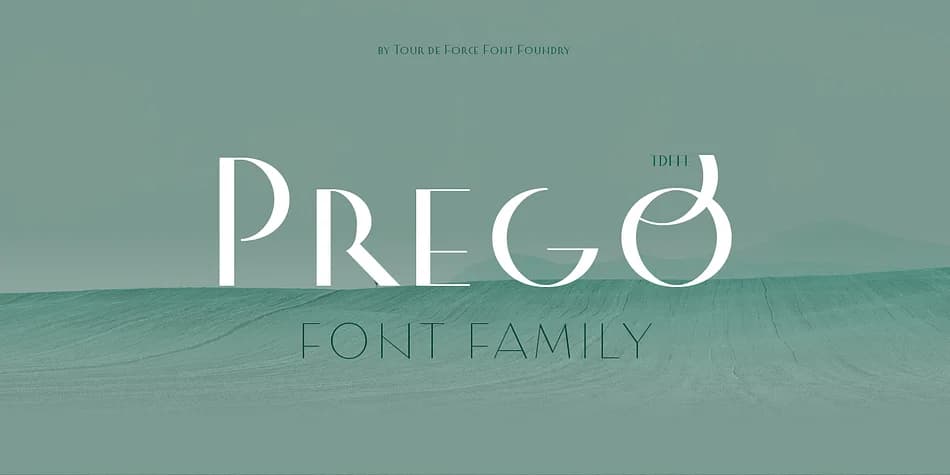
Prego, a decorative typeface from Tour de Force Font Foundry, grabs you with its high contrast: thin strokes nearly invisible beside heavy ones. This dramatic interplay somehow keeps the letterforms clean and elegant rather than chaotic or overwrought. The family spans three weights (Light, Regular, and Bold), giving you real options for controlling hierarchy and visual emphasis across a single layout without needing to switch between files.
What truly sets Prego apart is the substantial technical depth built into every single glyph. Swashes allow you to add flourishes to key letterforms, while stylistic and contextual alternates give you meaningful variation for repeated characters throughout a design. Fraction support handles numerals with precision, and extended Latin plus Cyrillic coverage means you can work across multiple languages without any gaps. That combination of decorative appeal and technical functionality makes it genuinely valuable for intricate, sophisticated design work.
The font excels in luxury wedding invitation suites, premium skincare and cosmetics packaging, editorial magazine headers, and high-end boutique retail branding. Designers who love ornamental lettering will find that the alternates system gives them nearly endless ways to customize each word's appearance. Grab Prego on Creative Fabrica and start layering those beautiful letterforms into your next creative project.
Style & Use Cases
- Overall Style
- Bold, Distinctive
- Use Case
- Headlines, Posters
- Ideal For
- logos, packaging, and standout titles
- Pairs With
- a neutral sans-serif
How to Install Prego Font
Step-by-step instructions for every platform
- 1Download the Prego font file (.ttf or .otf).
- 2Locate the downloaded file in your Downloads folder.
- 3Right-click the font file.
- 4Select "Install" to install for the current user, or "Install for all users" to make it available system-wide.
- 5Prego is now available in Word, Photoshop, Illustrator, and all other apps.
More by Tour de Force Font Foundry
View all →

Browse fonts by theme
Curated collections →Saw a font in a picture? Identify any font from an image with our free Font Finder.
More Decorative Fonts
Browse all →







What pairs well with Prego Font?
Prego Font is a decorative font that shines as a display or heading face. Pair it with a clean sans-serif or serif font for body text — the contrast creates a clear hierarchy while the two styles stay balanced and easy to read.



Prego Font
Reviewed by the FontBoxDL team · Updated June 2026