
 1 / 4
1 / 4About Porschey Font
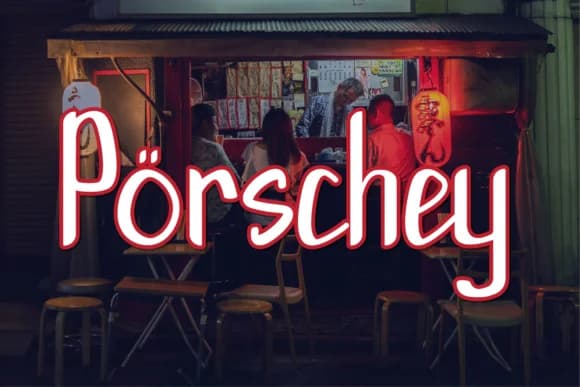
Porschey by noschey is a flowing handwritten script that brings contemporary elegance to digital and print projects. With smooth, connected letterforms and a refined modern sensibility, this typeface balances the warmth of hand-lettering with the polish of professional design. The result works equally well in editorial layouts, personal branding applications, and anywhere you need script with presence and sophisticated clarity. This versatile script excels across diverse creative scenarios. It's particularly well-suited for wedding invitation suites where you need that personal yet polished touch, cosmetic and boutique brand packaging that demands visual sophistication, social media graphics designed to stand out and perform on Instagram feeds and Stories, and bespoke event stationery for special occasions. The font's legible letterforms work beautifully for logo designs, especially for lifestyle and boutique brands seeking that handcrafted quality without sacrificing readability. You'll also find it excellent for food and beverage label design, greeting card collections, artistic book covers, and decorative interior signage, anywhere you're layering contemporary visual language with script elegance. Whether you're developing a complete brand system or creating standalone design pieces, Porschey offers the stylistic versatility and thoughtful craftsmanship to capture attention while maintaining clarity across all applications. Bring this contemporary script to your next project by acquiring Porschey on Creative Fabrica.
How to Install Porschey Font Font
Step-by-step instructions for every platform
- 1Download the Porschey Font font file (.ttf or .otf).
- 2Locate the downloaded file in your Downloads folder.
- 3Right-click the font file.
- 4Select "Install" to install for the current user, or "Install for all users" to make it available system-wide.
- 5Porschey Font is now available in Word, Photoshop, Illustrator, and all other apps.
More Script Handwritten Fonts
Browse all →







What pairs well with Porschey Font?
Porschey Font is a script font that shines as a display or heading face. Pair it with a clean sans-serif or serif font for body text — the contrast creates a clear hierarchy while the two styles stay balanced and easy to read.


Porschey Font
by noschey
Reviewed by the FontBoxDL team · Updated May 2026