 Firefox
 1 / 4
1 / 4About Pocatello JNL Font
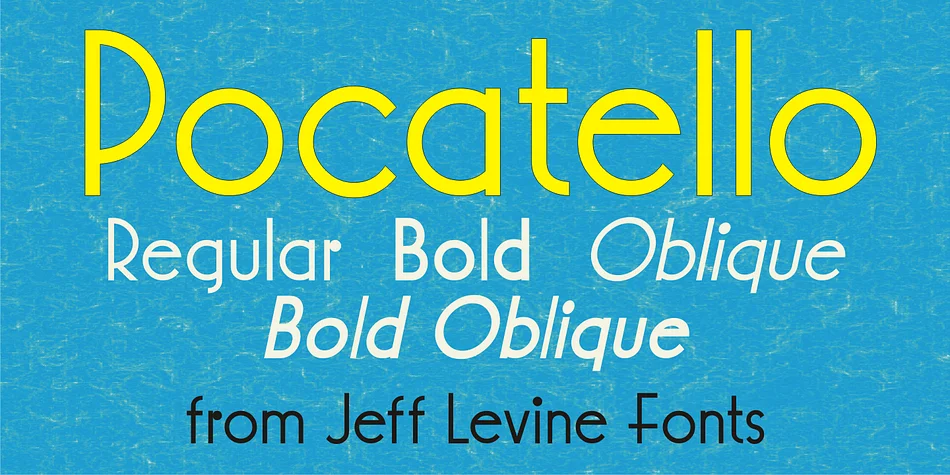
Pocatello JNL by Jeff Levine Fonts is a decorative typeface steeped in classic Hollywood glamour, inspired by the hand-lettered credits of vintage cinema. This is the kind of display face that brings theatrical flair and unmistakable retro charm to any project that needs an authentic midcentury aesthetic.
The typeface really sings in projects where that golden-age cinema look directly serves the content. Art deco event invitations, vintage cosmetics labels, theater marquee signage, and retro record covers all benefit from its distinctive personality. The letterforms have plenty of character and presence without veering into cartoon territory, which means it works equally well for bold decorative headers and even shorter, headline-style blocks of text. The geometry feels intentional and refined, with each character carrying that polished-but-playful energy you'd expect from the era that inspired it.
Pocatello is available in four versions (regular, oblique, bold, and bold oblique), giving you the flexibility to add weight and emphasis or shift the tone throughout a single design project. If you're hunting for that timeless Hollywood glamour that feels both sophisticated and fun at the same time, grab Pocatello JNL from Creative Fabrica.
Style & Use Cases
- Overall Style
- Bold, Distinctive
- Use Case
- Headlines, Posters
- Ideal For
- logos, packaging, and standout titles
- Pairs With
- a neutral sans-serif
How to Install Pocatello JNL Font
Step-by-step instructions for every platform
- 1Download the Pocatello JNL font file (.ttf or .otf).
- 2Locate the downloaded file in your Downloads folder.
- 3Right-click the font file.
- 4Select "Install" to install for the current user, or "Install for all users" to make it available system-wide.
- 5Pocatello JNL is now available in Word, Photoshop, Illustrator, and all other apps.
More by Jeff Levine Fonts
View all →



Browse fonts by theme
Curated collections →Saw a font in a picture? Identify any font from an image with our free Font Finder.
More Decorative Fonts
Browse all →







What pairs well with Pocatello JNL Font?
Pocatello JNL Font is a decorative font that shines as a display or heading face. Pair it with a clean sans-serif or serif font for body text — the contrast creates a clear hierarchy while the two styles stay balanced and easy to read.




Pocatello JNL Font
Reviewed by the FontBoxDL team · Updated June 2026