 Firefox
 1 / 8
1 / 8Loading font…
About Photographer Font
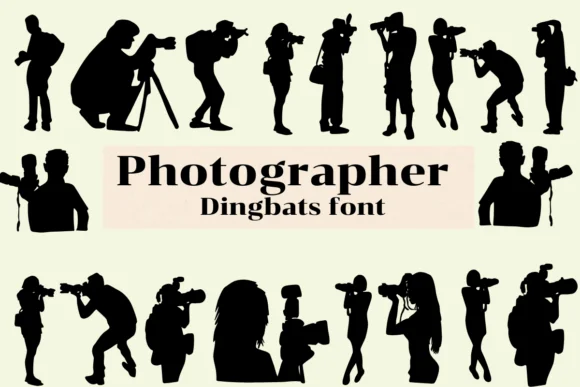
Photographer by Nongyao swaps out regular letters for a series of illustrated scenes centered on the art of picture-taking. Instead of A through Z, you get tiny vignettes: a photographer adjusting a tripod, silhouettes against city skylines, someone framing a shot at dawn, nighttime camera work. The letterforms carry genuine character and narrative quality because each glyph tells a small story rather than functioning as mere typography.
This dingbat font works beautifully for photography-specific projects where you want visual identity to match the subject matter. Consider using it for photography portfolio website headers, travel photography blog decorative elements, camera shop or studio branding, and photographer's portfolio book layouts. The font ships in both OTF and TTF formats, so you can install it across any modern design tool, from Adobe Suite to Affinity applications. Its completeness means you'll have access to the full alphabet without hunting for missing characters.
Photographers, design professionals, and educators working with visual storytelling will connect with this font's natural fit. It's especially valuable when you want ornamentation that feels thematic rather than generic or decorative just for its own sake. Head to Creative Fabrica to download Photographer and integrate these visual narratives directly into your layouts.
Style & Use Cases
- Overall Style
- Iconographic, Fonts
- Use Case
- Icons, Accents
- Ideal For
- ornaments, bullets, and decorative flourishes
- Pairs With
- any text font
How to Install Photographer Font
Step-by-step instructions for every platform
- 1Download the Photographer font file (.ttf or .otf).
- 2Locate the downloaded file in your Downloads folder.
- 3Right-click the font file.
- 4Select "Install" to install for the current user, or "Install for all users" to make it available system-wide.
- 5Photographer is now available in Word, Photoshop, Illustrator, and all other apps.




Browse fonts by theme
Curated collections →Saw a font in a picture? Identify any font from an image with our free Font Finder.
More Dingbats Fonts
Browse all →







What pairs well with Photographer Font?
Photographer Font is a versatile dingbats font that works for both headings and body text. Pair it with a contrasting sans-serif or serif font to add visual interest and a clear distinction between titles and body copy.




Photographer Font
by Nongyao
Reviewed by the FontBoxDL team · Updated October 2026