 Firefox
 1 / 5
1 / 5About PHOTO DEVELOPER JNL Font
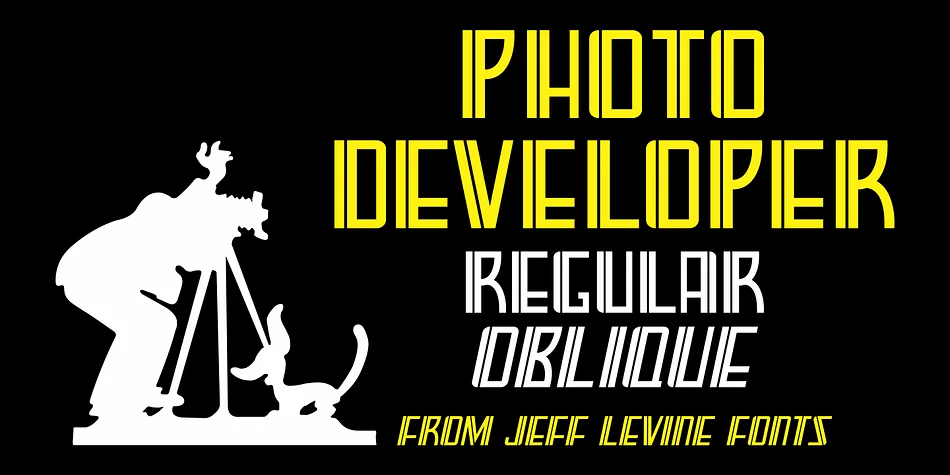
This typeface captures the nostalgic warmth of mid-century commercial signage. PHOTO DEVELOPER JNL, designed by Jeff Levine Fonts, takes its character directly from a hand-lettered storefront for a vintage photo laboratory, evoking the era when neighborhood photo labs were the primary destination for developing film, ordering prints, and browsing photographic supplies and camera equipment. The design merges thick and thin strokes in a distinctly Art Deco spirit, with a refined inline detail cutting through the heavier letterforms, adding visual depth and sophistication to every letter.
Both regular and oblique versions are included, giving you flexibility for dynamic tilted layouts. This typeface works beautifully for vintage poster headers, retro product packaging labels, nostalgic event invitations, artisanal craft supply branding, boutique film photography studio identities, and any project seeking that analog-era warmth. The strong decorative weight commands attention in display work, making it ideal for headlines that demand visual impact and personality. Pair it with a clean geometric sans-serif for body text and supporting details, and the contrast will let the decorative personality shine through. Find PHOTO DEVELOPER JNL on Creative Fabrica and bring some authentic analog character to your next design project.
Style & Use Cases
- Overall Style
- Bold, Distinctive
- Use Case
- Headlines, Posters
- Ideal For
- logos, packaging, and standout titles
- Pairs With
- a neutral sans-serif
How to Install PHOTO DEVELOPER JNL Font
Step-by-step instructions for every platform
- 1Download the PHOTO DEVELOPER JNL font file (.ttf or .otf).
- 2Locate the downloaded file in your Downloads folder.
- 3Right-click the font file.
- 4Select "Install" to install for the current user, or "Install for all users" to make it available system-wide.
- 5PHOTO DEVELOPER JNL is now available in Word, Photoshop, Illustrator, and all other apps.
More by Jeff Levine Fonts
View all →



Browse fonts by theme
Curated collections →Saw a font in a picture? Identify any font from an image with our free Font Finder.
More Decorative Fonts
Browse all →







What pairs well with PHOTO DEVELOPER JNL Font?
PHOTO DEVELOPER JNL Font is a decorative font that shines as a display or heading face. Pair it with a clean sans-serif or serif font for body text — the contrast creates a clear hierarchy while the two styles stay balanced and easy to read.




PHOTO DEVELOPER JNL Font
Reviewed by the FontBoxDL team · Updated June 2026