 Firefox
 1 / 8
1 / 8Loading font…
About Peeking Sheep Font
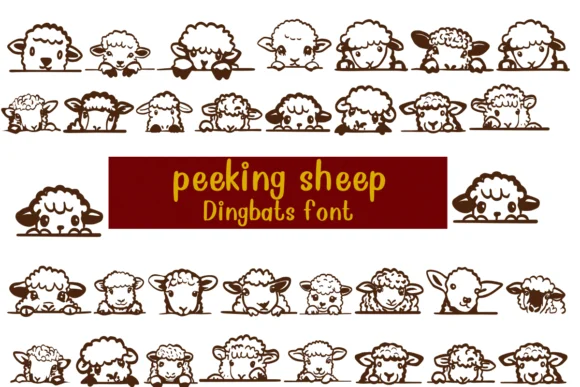
Peeking Sheep by Nongyao is a dingbat font where sheep characters peek playfully out of every glyph in the set. The concept is straightforward but effective: instead of abstract symbols, you get a cohesive cast of curious sheep that work together to create a unified visual language across whatever project you're building. It's the kind of font that feels instantly recognizable once you start using it, with enough genuine personality to carry a design on its own.
This font finds its natural home in projects that need gentle, approachable energy. Greeting card suites with pastoral themes work beautifully here, as do sticker sheets for planners and organizers, branding for yarn shops and fiber arts studios, or even educational merchandise and gift items for children. The outline versions built into the font family deserve special attention: they transform into coloring pages and printable worksheets without requiring any additional design work, making this particularly useful for teachers and parents creating activities or learning materials.
Compatibility is straightforward across the board: the font works across Procreate, Affinity Designer, and standard design software with no friction or installation hassles. If you need a dingbat that actually delivers personality instead of defaulting to generic cuteness, grab Peeking Sheep on Creative Fabrica.
Style & Use Cases
- Overall Style
- Iconographic, Fonts
- Use Case
- Icons, Accents
- Ideal For
- ornaments, bullets, and decorative flourishes
- Pairs With
- any text font
How to Install Peeking Sheep Font
Step-by-step instructions for every platform
- 1Download the Peeking Sheep font file (.ttf or .otf).
- 2Locate the downloaded file in your Downloads folder.
- 3Right-click the font file.
- 4Select "Install" to install for the current user, or "Install for all users" to make it available system-wide.
- 5Peeking Sheep is now available in Word, Photoshop, Illustrator, and all other apps.




Browse fonts by theme
Curated collections →Saw a font in a picture? Identify any font from an image with our free Font Finder.
More Dingbats Fonts
Browse all →







What pairs well with Peeking Sheep Font?
Peeking Sheep Font is a versatile dingbats font that works for both headings and body text. Pair it with a contrasting sans-serif or serif font to add visual interest and a clear distinction between titles and body copy.




Peeking Sheep Font
by Nongyao
Reviewed by the FontBoxDL team · Updated October 2026