 Firefox
 1 / 5
1 / 5About NOW SHOWING JNL Font
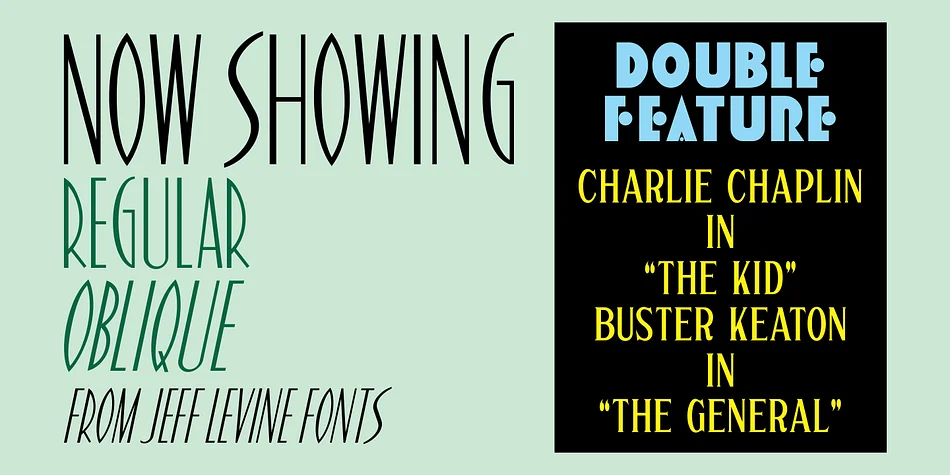
Now Showing JNL draws from the hand-lettered headlines that appeared in a 1937 issue of Hollywood Now magazine, bringing authentic Art Deco styling to your font library. Designed by Jeff Levine Fonts, this decorative typeface features a narrow construction with dynamic thick-and-thin contrast that commands attention in any layout. The stylized characters evoke golden-age cinema, offering theatrical sophistication without the costume-like feel common in many period revival fonts.
The font's distinctive aesthetic suits vintage poster designs, boutique theater marquee graphics, wine label layouts, and retro wedding invitation suites beautifully. Each letterform balances delicate hairlines against chunky terminals, creating visual depth that reads clearly even at smaller sizes. The typeface comes in both regular and oblique versions, allowing equal versatility in upright and italicized applications while maintaining its period character throughout.
Graphic designers and hand-lettering enthusiasts drawn to mid-century revival work will want this font for any project requiring authentic 1930s period feeling. Use it for vintage-inspired packaging, theater event suites, speakeasy signage, or any application celebrating classic Hollywood glamour without irony. Get Now Showing JNL through your Creative Fabrica subscription for unlimited downloads and commercial-use licensing across your entire design portfolio.
Style & Use Cases
- Overall Style
- Bold, Distinctive
- Use Case
- Headlines, Posters
- Ideal For
- logos, packaging, and standout titles
- Pairs With
- a neutral sans-serif
How to Install NOW SHOWING JNL Font
Step-by-step instructions for every platform
- 1Download the NOW SHOWING JNL font file (.ttf or .otf).
- 2Locate the downloaded file in your Downloads folder.
- 3Right-click the font file.
- 4Select "Install" to install for the current user, or "Install for all users" to make it available system-wide.
- 5NOW SHOWING JNL is now available in Word, Photoshop, Illustrator, and all other apps.
More by Jeff Levine Fonts
View all →



Browse fonts by theme
Curated collections →Saw a font in a picture? Identify any font from an image with our free Font Finder.
More Decorative Fonts
Browse all →







What pairs well with NOW SHOWING JNL Font?
NOW SHOWING JNL Font is a decorative font that shines as a display or heading face. Pair it with a clean sans-serif or serif font for body text — the contrast creates a clear hierarchy while the two styles stay balanced and easy to read.




NOW SHOWING JNL Font
Reviewed by the FontBoxDL team · Updated June 2026