 Firefox
 1 / 5
1 / 5About NOUVEAU CALENDAR JNL Font
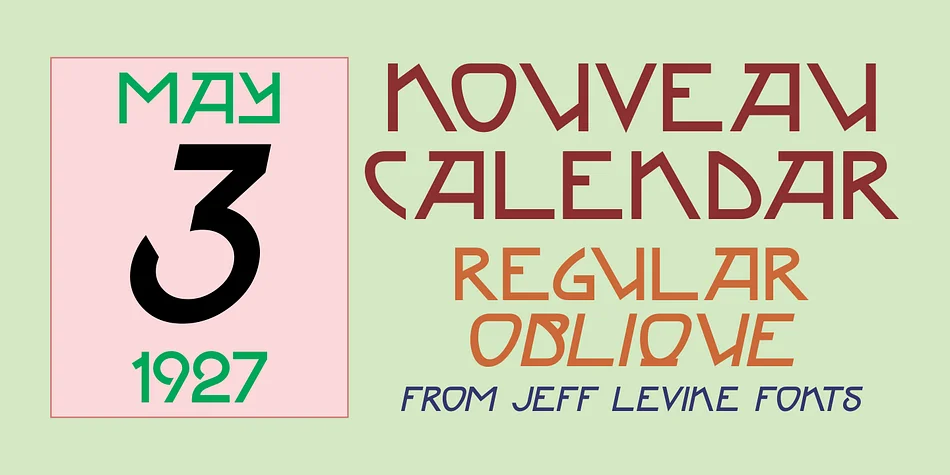
Picture designing a wedding invitation suite with art deco flair, or creating custom labels for artisanal tea packaging that truly needs period authenticity and character. Nouveau Calendar JNL from Jeff Levine Fonts draws direct inspiration from Koloman Moser's iconic lettering on the Fromme's Calendar poster of 1912, capturing that Vienna Secession elegance in fully digital form. Moser was an Austrian graphic designer whose influence shaped twentieth-century design through his pioneering work with the Vienna Secession movement and the Wiener Werkstätte, bringing refined aesthetic sensibilities to everything from ceramics to typography and beyond.
This font shines in vintage-inspired invitations, high-end packaging design for artisanal brands, retro event posters, and decorative book covers. The letterforms carry that distinctive early-twentieth-century sophistication, reading as historical and refined without feeling stuffy or difficult to read at large display sizes. Both regular and oblique versions give you flexibility in how you set headlines and body text, letting you angle emphasis exactly where it needs to land best.
The two cuts are practical additions to any font library for creating visual variety and dimensionality without switching typefaces entirely. Get this Vienna Secession classic on Creative Fabrica and bring authentic 1912 design elegance to your next project.
Style & Use Cases
- Overall Style
- Bold, Distinctive
- Use Case
- Headlines, Posters
- Ideal For
- logos, packaging, and standout titles
- Pairs With
- a neutral sans-serif
How to Install NOUVEAU CALENDAR JNL Font
Step-by-step instructions for every platform
- 1Download the NOUVEAU CALENDAR JNL font file (.ttf or .otf).
- 2Locate the downloaded file in your Downloads folder.
- 3Right-click the font file.
- 4Select "Install" to install for the current user, or "Install for all users" to make it available system-wide.
- 5NOUVEAU CALENDAR JNL is now available in Word, Photoshop, Illustrator, and all other apps.
More by Jeff Levine Fonts
View all →



Browse fonts by theme
Curated collections →Saw a font in a picture? Identify any font from an image with our free Font Finder.
More Decorative Fonts
Browse all →







What pairs well with NOUVEAU CALENDAR JNL Font?
NOUVEAU CALENDAR JNL Font is a decorative font that shines as a display or heading face. Pair it with a clean sans-serif or serif font for body text — the contrast creates a clear hierarchy while the two styles stay balanced and easy to read.




NOUVEAU CALENDAR JNL Font
Reviewed by the FontBoxDL team · Updated June 2026