 Firefox
 1 / 5
1 / 5About NOUVEAU BOUTIQUE JNL Font
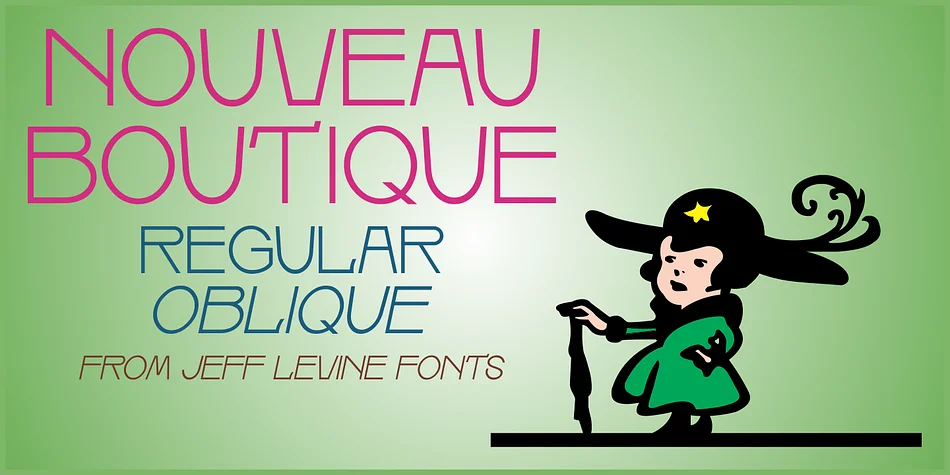
Graceful curves and balanced proportions drawn from Art Nouveau design characterize this lightweight sans serif, which avoids preciousness without sacrificing elegance. Nouveau Boutique JNL by Jeff Levine Fonts brings that sensibility to life with a playful, sophisticated character that reads as contemporary. The typeface works when you want genuine personality paired with strong legibility across various sizes and applications.
The font ships in regular and oblique weights, letting you vary emphasis and layering throughout a design. The oblique version is particularly useful for adding directional energy or creating subtle visual hierarchy without overwhelming a composition. This personality suits wedding invitation suites with a vintage feel, boutique packaging for artisanal cosmetics and skincare that need understated elegance, café menus seeking understated charm, and indie product labels for handmade goods on Etsy. Literary journals, vintage-modern book covers, and personal stationery all benefit from the typeface's ability to feel both timeless and current.
If you're a designer or creative entrepreneur drawn to historical type references and Art Deco aesthetics, this font deserves a spot in your collection. You'll find Nouveau Boutique JNL on Creative Fabrica, ready to bring refined vintage character to your next project.
Style & Use Cases
- Overall Style
- Bold, Distinctive
- Use Case
- Headlines, Posters
- Ideal For
- logos, packaging, and standout titles
- Pairs With
- a neutral sans-serif
How to Install NOUVEAU BOUTIQUE JNL Font
Step-by-step instructions for every platform
- 1Download the NOUVEAU BOUTIQUE JNL font file (.ttf or .otf).
- 2Locate the downloaded file in your Downloads folder.
- 3Right-click the font file.
- 4Select "Install" to install for the current user, or "Install for all users" to make it available system-wide.
- 5NOUVEAU BOUTIQUE JNL is now available in Word, Photoshop, Illustrator, and all other apps.
More by Jeff Levine Fonts
View all →



Browse fonts by theme
Curated collections →Saw a font in a picture? Identify any font from an image with our free Font Finder.
More Decorative Fonts
Browse all →







What pairs well with NOUVEAU BOUTIQUE JNL Font?
NOUVEAU BOUTIQUE JNL Font is a decorative font that shines as a display or heading face. Pair it with a clean sans-serif or serif font for body text — the contrast creates a clear hierarchy while the two styles stay balanced and easy to read.




NOUVEAU BOUTIQUE JNL Font
Reviewed by the FontBoxDL team · Updated June 2026