
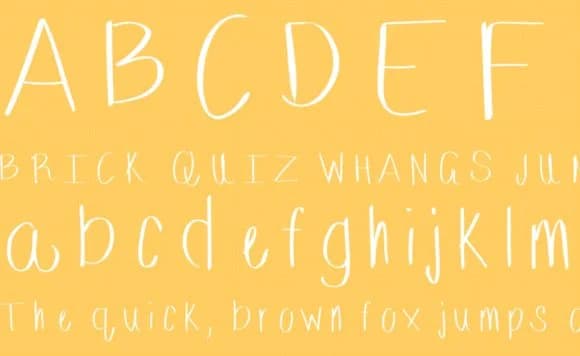
About Nothing Fancy Font
Nothing Fancy Font by D'nella Gay is a handwritten script with thin, elegant lines that work through understated simplicity rather than ornamental complexity. The typeface carries a refreshingly honest approach to script design, proving that effective letterforms don't require excessive flourish or decoration to create genuine visual impact. Its clean, refined character makes it ideal for wedding invitation suites, personal stationery design, and boutique packaging labels where minimalist aesthetics set exactly the right brand tone. Beyond formal applications, Nothing Fancy offers versatility for greeting card lettering, custom monogram designs, and calligraphy-inspired craft projects that benefit from readable elegance. The font handles everything from carefully considered save-the-date cards to DIY journal covers with confidence, the delicate letterforms remain legible while the handwritten quality adds warmth and personality to your design work. Whether your project needs formal sophistication or casual charm, the consistent line weight and refined construction support both directions equally well. Nothing Fancy Font proves that restraint in design often speaks louder than excess. Explore how this thoughtfully crafted script can enhance your next creative project by finding it on Creative Fabrica.
How to Install Nothing Fancy Font Font
Step-by-step instructions for every platform
- 1Download the Nothing Fancy Font font file (.ttf or .otf).
- 2Locate the downloaded file in your Downloads folder.
- 3Right-click the font file.
- 4Select "Install" to install for the current user, or "Install for all users" to make it available system-wide.
- 5Nothing Fancy Font is now available in Word, Photoshop, Illustrator, and all other apps.
More Script Handwritten Fonts
Browse all →







What pairs well with Nothing Fancy Font?
Nothing Fancy Font is a script font that shines as a display or heading face. Pair it with a clean sans-serif or serif font for body text — the contrast creates a clear hierarchy while the two styles stay balanced and easy to read.


Nothing Fancy Font
by D'nella Gay
Reviewed by the FontBoxDL team · Updated May 2026