 Firefox
About NOBODY HOME JNL Font
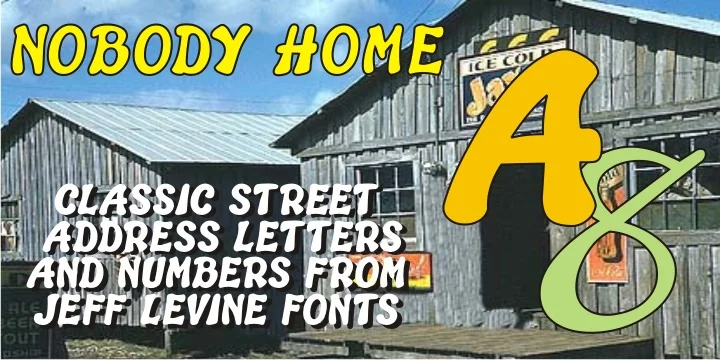
This font carries a nostalgic, industrial confidence that adds instant character to any space. NOBODY HOME JNL, designed by Jeff Levine Fonts, draws from two distinct vintage typestyles that spent decades fulfilling practical duties on residential buildings and property identification signs across America.
The letterforms strike a bold, asymmetrical stance while the numerals lean into a calligraphic, almost script-like rhythm. Each brings its own distinct character, creating a visual push-pull that makes the font memorable. Its character set stays intentionally minimal: uppercase and lowercase letters, numerals, and basic punctuation marks. Like most vintage designs adapted to digital, the kerning benefits from some manual tweaking to achieve just the right spacing, particularly when precision matters most.
You'll find this font genuinely useful for house number plaques, apartment door markers, mailbox identification stickers, entrance name signage for small residential buildings, and cottage welcome boards. It performs equally well in print projects or as a cutting guide for vinyl graphics. Complement it with a clean, modern sans-serif typeface for accompanying text, allowing this font to do what it does best: command attention with personality and vintage charm. Grab NOBODY HOME JNL on Creative Fabrica and bring this hardworking style into your next project.
Style & Use Cases
- Overall Style
- Bold, Distinctive
- Use Case
- Headlines, Posters
- Ideal For
- logos, packaging, and standout titles
- Pairs With
- a neutral sans-serif
How to Install NOBODY HOME JNL Font
Step-by-step instructions for every platform
- 1Download the NOBODY HOME JNL font file (.ttf or .otf).
- 2Locate the downloaded file in your Downloads folder.
- 3Right-click the font file.
- 4Select "Install" to install for the current user, or "Install for all users" to make it available system-wide.
- 5NOBODY HOME JNL is now available in Word, Photoshop, Illustrator, and all other apps.
More by Jeff Levine Fonts
View all →



Browse fonts by theme
Curated collections →Saw a font in a picture? Identify any font from an image with our free Font Finder.
More Decorative Fonts
Browse all →







What pairs well with NOBODY HOME JNL Font?
NOBODY HOME JNL Font is a decorative font that shines as a display or heading face. Pair it with a clean sans-serif or serif font for body text — the contrast creates a clear hierarchy while the two styles stay balanced and easy to read.




NOBODY HOME JNL Font
Reviewed by the FontBoxDL team · Updated July 2026