 Firefox
 1 / 7
1 / 7About Neuliner Font
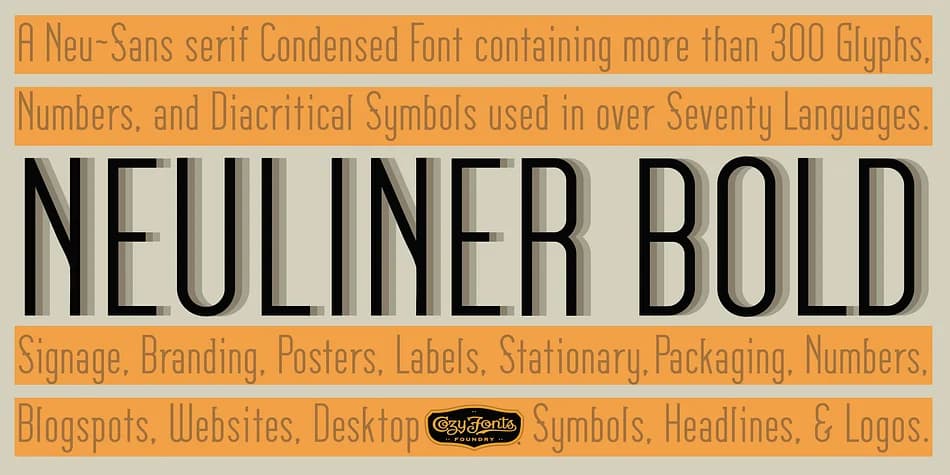
This font strikes that rare balance between refined restraint and visual punch. Neuliner, designed by CozyFonts Foundry, channels Art Deco's slender precision through seven distinct styles that feel cohesive despite their tonal differences. The core Medium and Bold weights anchor the family, with Italic, Outline, Drop, Rough, and Rounded variants each adding their own character while maintaining the same vertical emphasis and condensed proportions.
What makes this typeface genuinely useful is how thoroughly it handles specific projects. The Drop and Rough styles excel in dramatic branding work: think luxury wedding invitation design, high-end product packaging, or boutique stationary suites. They give you textured visual interest without clutter. For monograms and logo concepts, the Outline variant creates that transparent, layered effect that feels sophisticated. Meanwhile, the Rounded weight works beautifully for embossed or foil-stamped packaging, where precision matters. Supporting over 80 languages with 350+ glyphs (including numerals and dingbats), you can run entire identity systems from this single family.
Pair Neuliner with a clean, geometric sans-serif for body copy and you'll create dynamic contrast while maintaining readability across editorial layouts and branding systems. The full range is available on Creative Fabrica, making it an investment that pays dividends in versatile, professional applications.
Style & Use Cases
- Overall Style
- Bold, Distinctive
- Use Case
- Headlines, Posters
- Ideal For
- logos, packaging, and standout titles
- Pairs With
- a neutral sans-serif
How to Install Neuliner Font
Step-by-step instructions for every platform
- 1Download the Neuliner font file (.ttf or .otf).
- 2Locate the downloaded file in your Downloads folder.
- 3Right-click the font file.
- 4Select "Install" to install for the current user, or "Install for all users" to make it available system-wide.
- 5Neuliner is now available in Word, Photoshop, Illustrator, and all other apps.
More by CozyFonts Foundry
View all →
Browse fonts by theme
Curated collections →Saw a font in a picture? Identify any font from an image with our free Font Finder.
More Decorative Fonts
Browse all →







What pairs well with Neuliner Font?
Neuliner Font is a decorative font that shines as a display or heading face. Pair it with a clean sans-serif or serif font for body text — the contrast creates a clear hierarchy while the two styles stay balanced and easy to read.



Neuliner Font
Reviewed by the FontBoxDL team · Updated June 2026