 Firefox
About NARROW DECO JNL Font
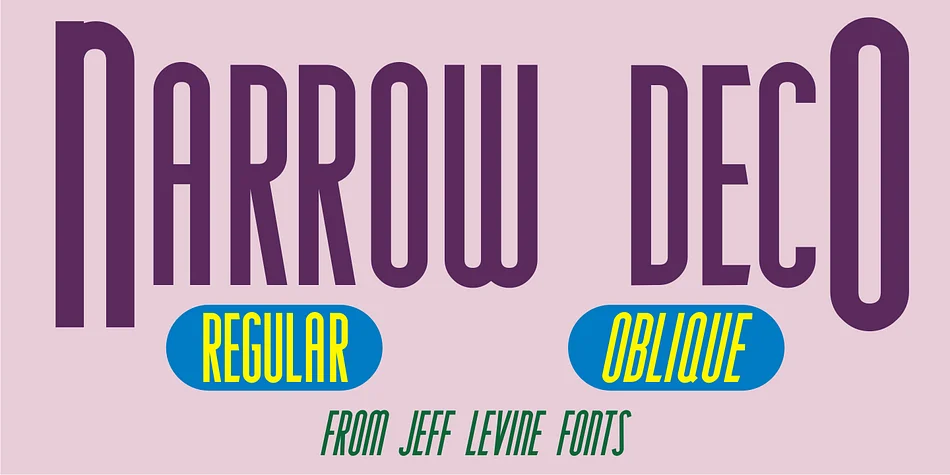
NARROW DECO JNL by Jeff Levine Fonts is an art deco display typeface sourced from genuine 1940s lettering. The designer began with hand-lettered typography that appeared on a vintage A.C. Gilbert Company puzzle box, then spent considerable time refining and redrawing every form with careful geometric consideration. One meaningful change stands out: the original letter 'P' used a rounded bowl, but the final version squares off that form entirely, giving the whole typeface a sharper, more architectural presence that catches light differently. The result feels authentically retro without reading as dated or costume-y.
Making the design work harder on the page, the typeface stretches all characters taller and narrower than the source material, creating a distinctive vertical emphasis that naturally commands attention in any layout. Both regular and oblique versions are available, allowing you to apply a subtle angle for extra movement and personality while maintaining full legibility across your designs.
This typeface shines for art deco wedding invitations and save-the-dates, vintage apothecary and boutique skincare packaging, speakeasy-themed bar graphics and signage, prohibition-era themed projects, and retro jazz-age poster design work. Find NARROW DECO JNL on Creative Fabrica to bring authentic 1940s character to your next creative project.
Style & Use Cases
- Overall Style
- Bold, Distinctive
- Use Case
- Headlines, Posters
- Ideal For
- logos, packaging, and standout titles
- Pairs With
- a neutral sans-serif
How to Install NARROW DECO JNL Font
Step-by-step instructions for every platform
- 1Download the NARROW DECO JNL font file (.ttf or .otf).
- 2Locate the downloaded file in your Downloads folder.
- 3Right-click the font file.
- 4Select "Install" to install for the current user, or "Install for all users" to make it available system-wide.
- 5NARROW DECO JNL is now available in Word, Photoshop, Illustrator, and all other apps.
More by Jeff Levine Fonts
View all →



Browse fonts by theme
Curated collections →Saw a font in a picture? Identify any font from an image with our free Font Finder.
More Decorative Fonts
Browse all →







What pairs well with NARROW DECO JNL Font?
NARROW DECO JNL Font is a decorative font that shines as a display or heading face. Pair it with a clean sans-serif or serif font for body text — the contrast creates a clear hierarchy while the two styles stay balanced and easy to read.




NARROW DECO JNL Font
Reviewed by the FontBoxDL team · Updated June 2026