
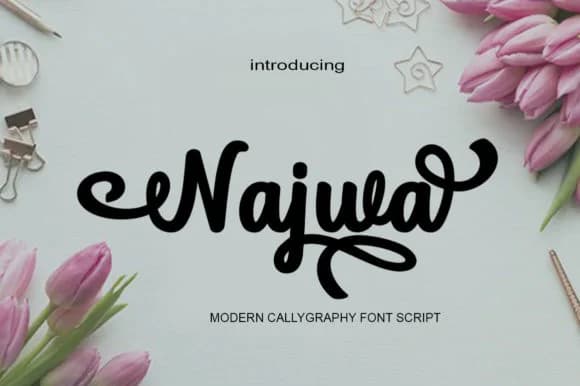
 1 / 9
1 / 9About Najwa Font
Najwa by saidi studio is a bold handwritten script with roots in classical calligraphy, but executed with a contemporary edge that keeps it from feeling dated. The letterforms have real character and enough presence to drive a design without needing much support, while remaining legible even at smaller sizes. This balance between flair and functionality makes it genuinely useful rather than purely decorative. You'll find it shines on wedding invitation suites, where it brings warmth and sophistication without the stuffiness that plagues so many script fonts. Boutique product labels, artisan packaging designs, and upscale event signage all benefit from its confident personality.
Beyond those obvious applications, Najwa works equally well for brand identities where you need visual distinction but can't rely on a font that reads as frivolous or pairs awkwardly with supporting typefaces. Luxury goods, handmade product lines, and editorial design projects all suit it perfectly. The script's construction means it handles body text better than most decorative fonts, which matters when you're building something beyond a single hero graphic. For designers who want a handwritten feel that reads as intentional rather than chaotic, this is a smart choice. Grab it on Creative Fabrica and start exploring what this personality-filled script can do for your next project.
Style & Use Cases
- Overall Style
- Elegant, Flowing, Najwa
- Use Case
- Invitations, Branding
- Ideal For
- wedding stationery, greeting cards, and signatures
- Pairs With
- a simple uppercase sans
How to Install Najwa Font Font
Step-by-step instructions for every platform
- 1Download the Najwa Font font file (.ttf or .otf).
- 2Locate the downloaded file in your Downloads folder.
- 3Right-click the font file.
- 4Select "Install" to install for the current user, or "Install for all users" to make it available system-wide.
- 5Najwa Font is now available in Word, Photoshop, Illustrator, and all other apps.
More by saidi studio
View all →
More Script Handwritten Fonts
Browse all →







What pairs well with Najwa Font?
Najwa Font is a script font that shines as a display or heading face. Pair it with a clean sans-serif or serif font for body text — the contrast creates a clear hierarchy while the two styles stay balanced and easy to read.



Najwa Font
by saidi studio
Reviewed by the FontBoxDL team · Updated June 2026