
 1 / 9
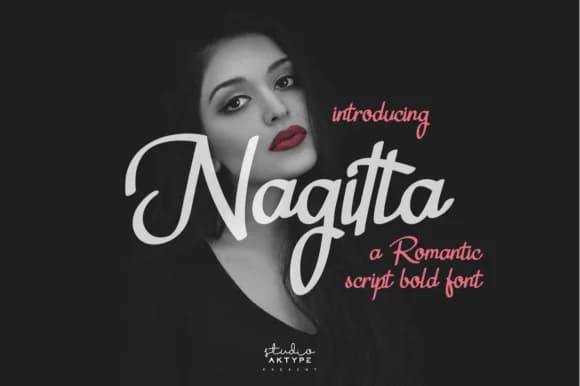
1 / 9About Nagitta Font
Nagitta by StudioAKTYPE is a flowing script font that truly captures the charm of hand-lettered romance. With its graceful letterforms and authentic brushstroke quality, this typeface brings warmth and genuine emotional resonance to intimate occasions and personal creative projects. The design excels at creating meaningful visual impact through typography, making it an outstanding choice for wedding invitation suites, personalized stationery sets, and sophisticated branding for handcrafted goods or beauty-focused businesses that value refined, distinctive design work.
From delicate greeting cards and celebration programs to elegant, sophisticated packaging design, Nagitta works beautifully across diverse applications that benefit from a human, intimate touch. Small business owners and creative professionals consistently favor it for save-the-date designs, elegant monogram compositions, and boutique product labeling where authenticity and refinement matter most. The font's consistent elegance translates seamlessly across both print and digital formats, ensuring every message carries personality, warmth, and visual sophistication. Whether you're creating luxury packaging for artisan products, designing celebration materials, or developing a distinctive brand identity that demands refinement and genuine character, Nagitta delivers the romantic sensibility that sets apart contemporary creative work from the ordinary.
Discover how this handwritten script can transform your next project by exploring it on Creative Fabrica.
Style & Use Cases
- Overall Style
- Elegant, Flowing, Nagitta
- Use Case
- Invitations, Branding
- Ideal For
- wedding stationery, greeting cards, and signatures
- Pairs With
- a simple uppercase sans
How to Install Nagitta Font Font
Step-by-step instructions for every platform
- 1Download the Nagitta Font font file (.ttf or .otf).
- 2Locate the downloaded file in your Downloads folder.
- 3Right-click the font file.
- 4Select "Install" to install for the current user, or "Install for all users" to make it available system-wide.
- 5Nagitta Font is now available in Word, Photoshop, Illustrator, and all other apps.
More by StudioAKTYPE
View all →
More Script Handwritten Fonts
Browse all →







What pairs well with Nagitta Font?
Nagitta Font is a script font that shines as a display or heading face. Pair it with a clean sans-serif or serif font for body text — the contrast creates a clear hierarchy while the two styles stay balanced and easy to read.



Nagitta Font
by StudioAKTYPE
Reviewed by the FontBoxDL team · Updated May 2026