 Firefox
 1 / 8
1 / 8About Mystic Tattoo Set Font
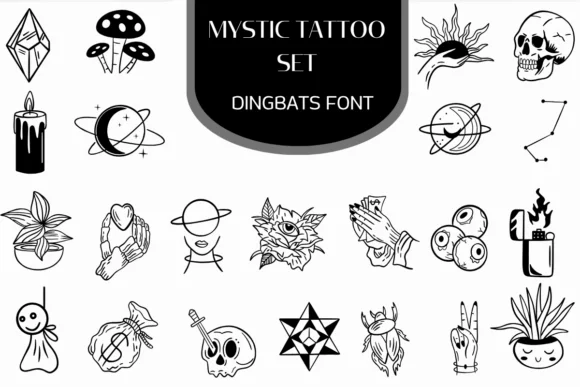
You're designing custom tattoo flash sheets or creating merchandise for a gothic band, and you need icons that feel genuinely crafted, not off-the-shelf. The Mystic Tattoo Set from Heartcraft Atelier brings 30+ hand-drawn dingbat symbols into your design work, each with bold lines and a minimalist style that somehow stays expressive. The set covers mystical hands, celestial bodies, skulls, crystals, potions, candles, and other occult imagery that reads cleanly at any size.
Typing a single letter inserts each vector illustration directly into your canvas, which beats hunting through asset folders or managing dozens of separate files. Full compatibility with all major design software means there's no setup or plugin installation. Use it for occult podcast cover art, celestial wedding invitations, tarot deck borders, and witchy product labels for candle makers and apothecary brands. Tattoo artists use it for quick flash development, while spiritual brand designers layer these symbols across packaging and social media.
The font carries enough character that it works solo or integrated into larger compositions, depending on what your project calls for. Grab the Mystic Tattoo Set on Creative Fabrica.
Style & Use Cases
- Overall Style
- Iconographic, Fonts
- Use Case
- Icons, Accents
- Ideal For
- ornaments, bullets, and decorative flourishes
- Pairs With
- any text font
How to Install Mystic Tattoo Set Font
Step-by-step instructions for every platform
- 1Download the Mystic Tattoo Set font file (.ttf or .otf).
- 2Locate the downloaded file in your Downloads folder.
- 3Right-click the font file.
- 4Select "Install" to install for the current user, or "Install for all users" to make it available system-wide.
- 5Mystic Tattoo Set is now available in Word, Photoshop, Illustrator, and all other apps.
More by Heartcraft Atelier
View all →



Browse fonts by theme
Curated collections →Saw a font in a picture? Identify any font from an image with our free Font Finder.
More Dingbats Fonts
Browse all →







What pairs well with Mystic Tattoo Set Font?
Mystic Tattoo Set Font is a versatile dingbats font that works for both headings and body text. Pair it with a contrasting sans-serif or serif font to add visual interest and a clear distinction between titles and body copy.




Mystic Tattoo Set Font
Reviewed by the FontBoxDL team · Updated June 2026