 Firefox
 1 / 6
1 / 6About My Top Secret Code Font
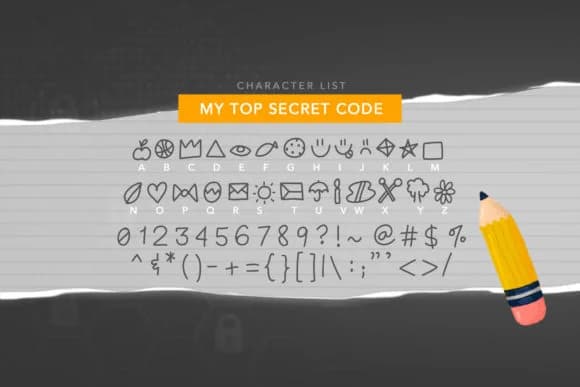
My Top Secret Code, created by Quirky Queen Media, replaces conventional letterforms with a collection of hand-drawn pictorial symbols and playful icon characters. The result is a dingbat font built for visual storytelling rather than traditional reading, with each glyph functioning as a small illustration you can layer, combine, and compose into larger patterns.
This works brilliantly for scrapbook embellishments and greeting card designs that need quirky personality and visual warmth. Try it for sticker sheets and planner decorations, DIY treasure hunt materials and escape room puzzle designs, or vintage-style gift labels and handmade tags. Because the characters are symbol-based, you can use them as standalone decorative accents, border elements, or build repeating patterns that add visual texture to layouts. The playful energy translates equally well to invitation suites with whimsical touches or craft project labels that feel handmade and deeply personal.
My Top Secret Code works best for scrapbookers, craft makers, and designers who want a fun, symbol-driven font that reads as genuinely human rather than corporate or generic. Available on Creative Fabrica, it's a quick addition to any designer's working toolkit.
Style & Use Cases
- Overall Style
- Iconographic, Top
- Use Case
- Icons, Accents
- Ideal For
- ornaments, bullets, and decorative flourishes
- Pairs With
- any text font
How to Install My Top Secret Code Font
Step-by-step instructions for every platform
- 1Download the My Top Secret Code font file (.ttf or .otf).
- 2Locate the downloaded file in your Downloads folder.
- 3Right-click the font file.
- 4Select "Install" to install for the current user, or "Install for all users" to make it available system-wide.
- 5My Top Secret Code is now available in Word, Photoshop, Illustrator, and all other apps.
More by Quirky Queen Media
View all →
Browse fonts by theme
Curated collections →Saw a font in a picture? Identify any font from an image with our free Font Finder.
More Dingbats Fonts
Browse all →







What pairs well with My Top Secret Code Font?
My Top Secret Code Font is a versatile dingbats font that works for both headings and body text. Pair it with a contrasting sans-serif or serif font to add visual interest and a clear distinction between titles and body copy.



My Top Secret Code Font
Reviewed by the FontBoxDL team · Updated July 2026