 Firefox
 1 / 7
1 / 7About Caramel Sundae Font
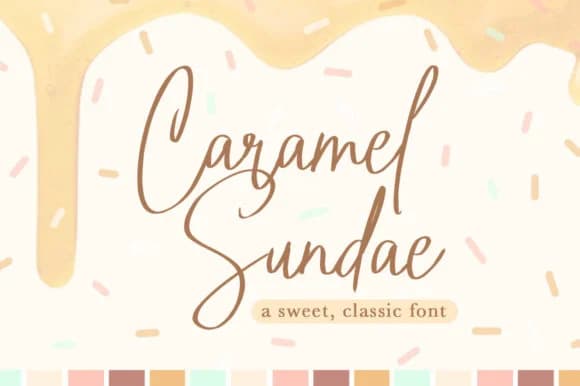
Caramel Sundae Font by Quirky Queen Media is a lighthearted handwritten script with a gentle, flowing character that feels both approachable and genuinely refined. Inspired by sweet indulgence, the typeface captures that warm, carefree energy you find in dessert branding, celebration design, and lifestyle work. Built specifically for wedding invitation suites where personality trumps formality, boutique cafe menus that set a welcoming tone, artisanal food packaging where genuine warmth matters, beauty and skincare labels that convey authenticity, and charming DIY craft signage, this font brings character wherever needed.
The light stroke weight maintains excellent legibility across all sizes, from bold headlines down to body copy on small packaging. Each curved letterform carries that authentic, hand-drawn quality that makes designs pop right off retail shelves and scroll past easily on Instagram. What sets it apart is versatility: it works just as well on luxury wedding stationery as it does on friendly farmer's market labels. Designers reach for this when you need to feel handmade rather than corporate. The consistent quality throughout the character set ensures professional results across both high-end stationery and personal creative projects.
Get Caramel Sundae Font on Creative Fabrica and bring that natural sweetness to your next design.
Style & Use Cases
- Overall Style
- Elegant, Flowing, Caramel Sundae
- Use Case
- Invitations, Branding
- Ideal For
- wedding stationery, greeting cards, and signatures
- Pairs With
- a simple uppercase sans
How to Install Caramel Sundae Font Font
Step-by-step instructions for every platform
- 1Download the Caramel Sundae Font font file (.ttf or .otf).
- 2Locate the downloaded file in your Downloads folder.
- 3Right-click the font file.
- 4Select "Install" to install for the current user, or "Install for all users" to make it available system-wide.
- 5Caramel Sundae Font is now available in Word, Photoshop, Illustrator, and all other apps.
More by Quirky Queen Media
View all →
Browse fonts by theme
Curated collections →Saw a font in a picture? Identify any font from an image with our free Font Finder.
More Script Handwritten Fonts
Browse all →







What pairs well with Caramel Sundae Font?
Caramel Sundae Font is a script font that shines as a display or heading face. Pair it with a clean sans-serif or serif font for body text — the contrast creates a clear hierarchy while the two styles stay balanced and easy to read.



Caramel Sundae Font
Reviewed by the FontBoxDL team · Updated June 2026