 Firefox
 1 / 8
1 / 8Loading font…
About Musical Notes Font
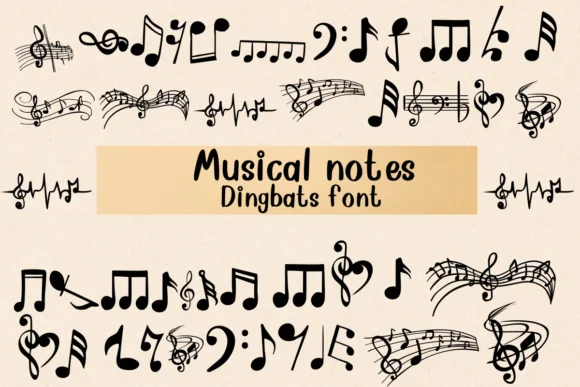
Picture a music lesson worksheet where the margins could use some visual interest, or a concert program that needs elegant symbols running through the layout. Musical Notes by Nongyao transforms the everyday alphabet into music notation: each letter and number becomes a symbol like notes, clefs, staff lines, and signs that tell a musical story. This isn't decoration or filler. It's functional type for anyone working in music-adjacent creative projects.
Teaching music becomes easier when your handouts can use actual notational symbols embedded in text rather than hunting through clipart collections. The same principle applies to vinyl record sleeve layouts, where you might use these glyphs as decorative headers or callouts. Podcast cover art benefits from having note symbols available as literal letters. Concert posters, band merchandise, and festival programs all gain design flexibility when musical iconography becomes as simple as typing a character. The typeface ships in both OTF and TTF formats, fully compatible with Procreate, Affinity Photo, and Affinity Designer.
That clean, outlined style keeps the symbols readable at any size, whether you're referencing them on a tiny chord chart or displaying them across concert hall signage. Grab it on Creative Fabrica and put genuine musical intent back into your typography.
Style & Use Cases
- Overall Style
- Iconographic, Fonts
- Use Case
- Icons, Accents
- Ideal For
- ornaments, bullets, and decorative flourishes
- Pairs With
- any text font
How to Install Musical Notes Font
Step-by-step instructions for every platform
- 1Download the Musical Notes font file (.ttf or .otf).
- 2Locate the downloaded file in your Downloads folder.
- 3Right-click the font file.
- 4Select "Install" to install for the current user, or "Install for all users" to make it available system-wide.
- 5Musical Notes is now available in Word, Photoshop, Illustrator, and all other apps.




Browse fonts by theme
Curated collections →Saw a font in a picture? Identify any font from an image with our free Font Finder.
More Dingbats Fonts
Browse all →







What pairs well with Musical Notes Font?
Musical Notes Font is a versatile dingbats font that works for both headings and body text. Pair it with a contrasting sans-serif or serif font to add visual interest and a clear distinction between titles and body copy.




Musical Notes Font
by Nongyao
Reviewed by the FontBoxDL team · Updated October 2026