 Firefox
 1 / 8
1 / 8About Music Notes Font
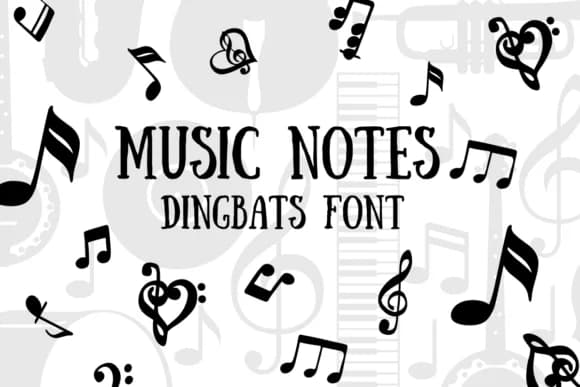
Imagine designing a music lesson worksheet or a concert flyer and needing quick, recognizable musical symbols scattered throughout. Music Notes, created by CHANOK, is a dingbat font that replaces standard letters and numbers with actual musical notation characters. Rather than typing the letter "A," you get treble clefs, staff lines, multiple note shapes, bass clefs, and dozens of other symbols that musicians and educators rely on constantly.
This font shines in several real-world scenarios. Use it for music worksheets and study guides where notation symbols enhance learning without cluttering text. It works equally well for choir posters, band promotional materials, and concert announcements that need authentic musical iconography. Graphic designers building vinyl record label graphics, podcast artwork for music shows, and DJ branding all benefit from having these characters mapped directly to the keyboard. You can also use it for school music program badges, songwriting notebooks, and even greeting cards aimed at musicians.
Scale these characters up for window signage or down for worksheet annotations, and they remain crisp and clear. All the symbols you need are directly accessible from your keyboard. Find Music Notes on Creative Fabrica and start integrating authentic musical notation into your designs.
Style & Use Cases
- Overall Style
- Iconographic, Music
- Use Case
- Icons, Accents
- Ideal For
- ornaments, bullets, and decorative flourishes
- Pairs With
- any text font
How to Install Music Notes Font
Step-by-step instructions for every platform
- 1Download the Music Notes font file (.ttf or .otf).
- 2Locate the downloaded file in your Downloads folder.
- 3Right-click the font file.
- 4Select "Install" to install for the current user, or "Install for all users" to make it available system-wide.
- 5Music Notes is now available in Word, Photoshop, Illustrator, and all other apps.
More by CHANOK
View all →

Browse fonts by theme
Curated collections →Saw a font in a picture? Identify any font from an image with our free Font Finder.
More Dingbats Fonts
Browse all →







What pairs well with Music Notes Font?
Music Notes Font is a versatile dingbats font that works for both headings and body text. Pair it with a contrasting sans-serif or serif font to add visual interest and a clear distinction between titles and body copy.



Music Notes Font
by CHANOK
Reviewed by the FontBoxDL team · Updated June 2026