 Firefox
About MUSIC LESSON JNL Font
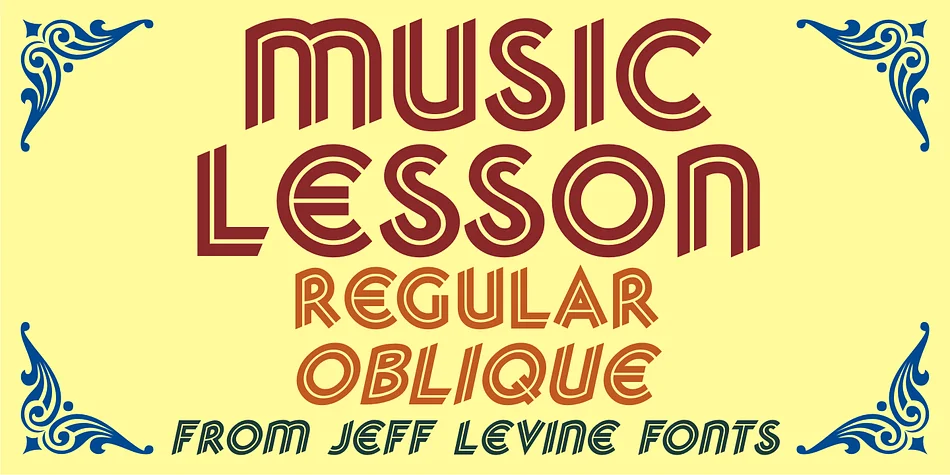
Music Lesson JNL by Jeff Levine Fonts is a decorative Art Deco typeface with striking dual-line letterforms, drawn directly from 1940s-50s music publishing design. Hand-lettered song titles on Miller Music Corporation's piano solo sheet covers inspired this digital recreation, and the typeface faithfully captures that era's distinctive geometric character and graphic sophistication. The result feels authentically vintage without slipping into pastiche or nostalgia for its own sake.
You'll find this font perfectly suited for vintage jazz club posters, sheet music covers and concert program notes, album artwork and record label designs, music lesson certificates and studio signage, or retro music merchandise packaging. The dual-line construction gives each letter inherent visual dimension, so even in single-color applications the letterforms read with surprising depth and texture. Available in both regular and oblique versions, you get the flexibility to italicize the text when your layout calls for dynamic movement.
These letterforms carry genuine period authenticity, fitting equally well into vintage-inspired branding systems, editorial layouts rooted in retro music culture, or historical music packaging work. The design delivers that aesthetic without requiring heavy-handed period references. Get Music Lesson JNL from Creative Fabrica and bring the golden age of sheet music design into your next project.
Style & Use Cases
- Overall Style
- Bold, Distinctive
- Use Case
- Headlines, Posters
- Ideal For
- logos, packaging, and standout titles
- Pairs With
- a neutral sans-serif
How to Install MUSIC LESSON JNL Font
Step-by-step instructions for every platform
- 1Download the MUSIC LESSON JNL font file (.ttf or .otf).
- 2Locate the downloaded file in your Downloads folder.
- 3Right-click the font file.
- 4Select "Install" to install for the current user, or "Install for all users" to make it available system-wide.
- 5MUSIC LESSON JNL is now available in Word, Photoshop, Illustrator, and all other apps.
More by Jeff Levine Fonts
View all →



Browse fonts by theme
Curated collections →Saw a font in a picture? Identify any font from an image with our free Font Finder.
More Decorative Fonts
Browse all →







What pairs well with MUSIC LESSON JNL Font?
MUSIC LESSON JNL Font is a decorative font that shines as a display or heading face. Pair it with a clean sans-serif or serif font for body text — the contrast creates a clear hierarchy while the two styles stay balanced and easy to read.




MUSIC LESSON JNL Font
Reviewed by the FontBoxDL team · Updated June 2026