 Firefox
 1 / 5
1 / 5About MOVIE PRODUCTION JNL Font
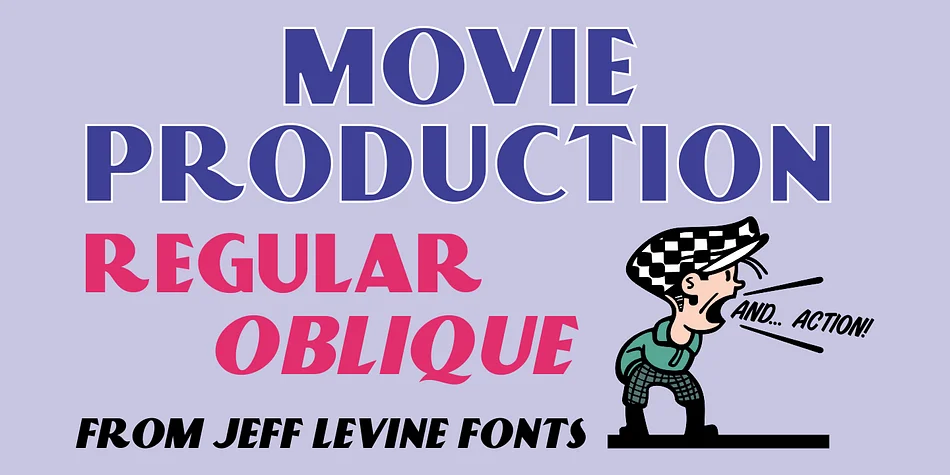
The bold, geometric letterforms of this typeface capture the unmistakable spirit of 1930s commercial design. Movie Production JNL, created by Jeff Levine Fonts, draws directly from vintage advertising history, sourced from a Warner Brothers-First National Pictures advertisement hand-lettered in the classic Art Deco sans style of that era. The letterforms carry the confident, theatrical weight and architectural precision that defined the era's finest commercial typography, complete with all the geometric clarity that made Art Deco instantly recognizable.
You get both a regular weight and an oblique version, giving you the flexibility to deploy the font across different contexts and design applications. This typeface excels wherever vintage authenticity and bold impact are priorities. Think retro movie posters and entertainment event signage, speakeasy-themed menus and bar branding that evokes Jazz Age glamour, art deco wedding invitations, and vintage album cover designs. Headline typography for print magazines looking for a distinctly period-correct aesthetic works beautifully with this font, as do boutique fashion and beauty brands seeking that nostalgic edge.
Movie Production JNL suits designers and creative teams building 1930s-inspired work or projects that need that classic Hollywood look and period-authentic impact. Find the font on Creative Fabrica.
Style & Use Cases
- Overall Style
- Bold, Distinctive
- Use Case
- Headlines, Posters
- Ideal For
- logos, packaging, and standout titles
- Pairs With
- a neutral sans-serif
How to Install MOVIE PRODUCTION JNL Font
Step-by-step instructions for every platform
- 1Download the MOVIE PRODUCTION JNL font file (.ttf or .otf).
- 2Locate the downloaded file in your Downloads folder.
- 3Right-click the font file.
- 4Select "Install" to install for the current user, or "Install for all users" to make it available system-wide.
- 5MOVIE PRODUCTION JNL is now available in Word, Photoshop, Illustrator, and all other apps.
More by Jeff Levine Fonts
View all →



Browse fonts by theme
Curated collections →Saw a font in a picture? Identify any font from an image with our free Font Finder.
More Decorative Fonts
Browse all →







What pairs well with MOVIE PRODUCTION JNL Font?
MOVIE PRODUCTION JNL Font is a decorative font that shines as a display or heading face. Pair it with a clean sans-serif or serif font for body text — the contrast creates a clear hierarchy while the two styles stay balanced and easy to read.




MOVIE PRODUCTION JNL Font
Reviewed by the FontBoxDL team · Updated June 2026