 Firefox
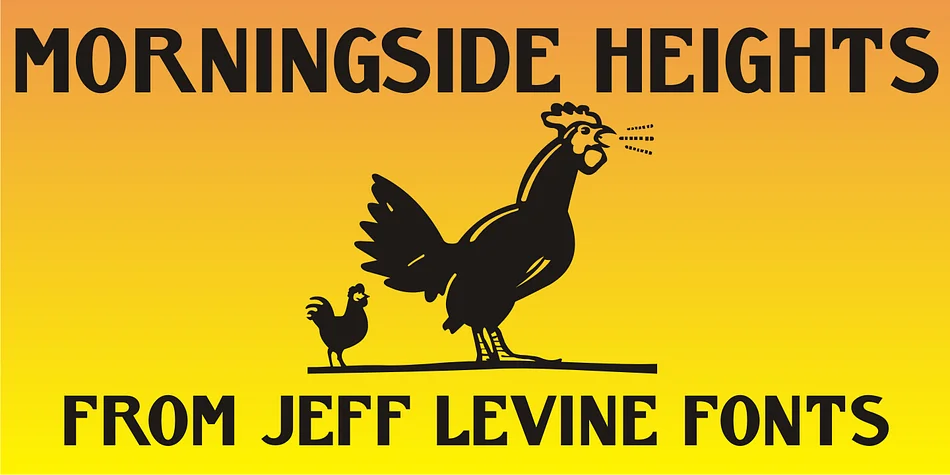
About MORNINGSIDE HEIGHTS JNL Font
Picture yourself designing a wedding invitation suite in that jewel-toned 1920s style, the kind that stops people mid-scroll on Pinterest. You pull up Morningside Heights JNL, a decorative font by Jeff Levine Fonts named after the historic Manhattan neighborhood, and immediately know you've found the right voice. Based on hand lettering discovered on era sheet music, this typeface channels authentic Art Nouveau character without ever feeling like a museum piece or pastiche.
What makes this font distinctive is what makes hand-lettering from that period so compelling: the line weights shift unexpectedly, character widths vary throughout the alphabet, and individual shapes take subtle compositional risks that feel intentional rather than accidental. That irregular quality is exactly what works for art deco-inspired packaging, speakeasy menu covers, retro concert posters, and letterpress-style invitations. It reads as truly vintage rather than costume-y, which matters when your client can actually spot the difference.
The experimental character work particularly shines at larger display sizes, where those quirky proportions become real design strengths. You'll appreciate how it handles the full nuance of that era with character and credibility. Grab it on Creative Fabrica and start building your next sophisticated or eclectic project.
Style & Use Cases
- Overall Style
- Bold, Distinctive
- Use Case
- Headlines, Posters
- Ideal For
- logos, packaging, and standout titles
- Pairs With
- a neutral sans-serif
How to Install MORNINGSIDE HEIGHTS JNL Font
Step-by-step instructions for every platform
- 1Download the MORNINGSIDE HEIGHTS JNL font file (.ttf or .otf).
- 2Locate the downloaded file in your Downloads folder.
- 3Right-click the font file.
- 4Select "Install" to install for the current user, or "Install for all users" to make it available system-wide.
- 5MORNINGSIDE HEIGHTS JNL is now available in Word, Photoshop, Illustrator, and all other apps.
More by Jeff Levine Fonts
View all →



Browse fonts by theme
Curated collections →Saw a font in a picture? Identify any font from an image with our free Font Finder.
More Decorative Fonts
Browse all →







What pairs well with MORNINGSIDE HEIGHTS JNL Font?
MORNINGSIDE HEIGHTS JNL Font is a decorative font that shines as a display or heading face. Pair it with a clean sans-serif or serif font for body text — the contrast creates a clear hierarchy while the two styles stay balanced and easy to read.




MORNINGSIDE HEIGHTS JNL Font
Reviewed by the FontBoxDL team · Updated June 2026