 Firefox

 1 / 3
Loading font…
About Mona Sans Mono Font
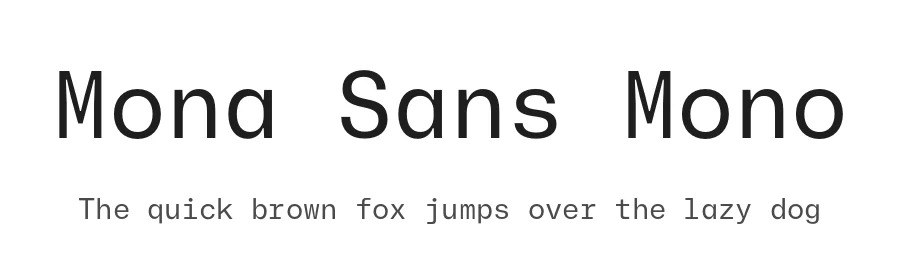
A documentation page with twenty code blocks on it lives or dies by its monospace. Mona Sans Mono, drawn by Kyle Wayne Benson and published by GitHub, is built for that kind of reading: fixed-width text someone scans for an hour at a stretch. The main file is the Regular, the weight most people will end up setting their body code in.
Ten files come with the family, so there are extra weights and styles when one cut won't carry a whole interface. Reach for a heavier one on the highlighted line in a terminal screenshot inside a README, or on column headers in a data table in an admin dashboard. Latin coverage runs past 310 languages, which helps when API reference pages get localized and you don't want a fallback font appearing halfway down a paragraph. Changelog entries and CI log output hold up well in it too.
At 13 or 14 px, give it more line height than you would a proportional face. Monospace lines run long, and the extra leading stops consecutive log lines from blurring into each other. Set large, in a lockup or a big section number, pull the tracking in slightly so the gaps between letters don't open up. Open Font License, commercial use allowed, download below.
Mona Sans Mono Specifications
| Font Family | Mona Sans Mono |
| Style | Regular |
| Full Name | Mona Sans Mono Regular |
| Version | 2.027 |
| Weight | 400 (Regular) |
| Glyph Count | 806 glyphs |
| PostScript Name | MonaSansMono-Regular |
| Designer | Kyle Wayne Benson |
| Format | OTF (CFF) |
| File Size | 67.4 KB |
OpenType Features
Mona Sans Mono ships with 8 OpenType features you can switch on in apps that support them (Illustrator, InDesign, Affinity, Figma, CSS font-feature-settings).
- Contextual alternates
- Case-sensitive forms
- Fractions
- Ordinals
- Scientific inferiors
- Subscripts
- Superscripts
- Stylistic sets (9)
Languages Supported
Mona Sans Mono supports 310 languages.
How to Install Mona Sans Mono Font
Step-by-step instructions for every platform
- 1Download the Mona Sans Mono font file (.ttf or .otf).
- 2Locate the downloaded file in your Downloads folder.
- 3Right-click the font file.
- 4Select "Install" to install for the current user, or "Install for all users" to make it available system-wide.
- 5Mona Sans Mono is now available in Word, Photoshop, Illustrator, and all other apps.
More by Kyle Wayne Benson
View all →

Browse fonts by theme
Curated collections →Saw a font in a picture? Identify any font from an image with our free Font Finder.
More Monospace Fonts
Browse all →
What pairs well with Mona Sans Mono Font?
Mona Sans Mono Font is a versatile monospace font that works for both headings and body text. Pair it with a contrasting sans-serif or serif font to add visual interest and a clear distinction between titles and body copy.




Mona Sans Mono Font
Reviewed by the FontBoxDL team · Updated November 2026